As a drummer planning to invest in electronic drum pads with sticks, you’ll benefit from knowing the leading brands and models available. I also recommend getting acquainted with the three main types of pads: sample pads, percussion pads, and all-in-one electronic drum pads.

Many percussion pads send MIDI performance data to compatible software or other instruments. MIDI does not carry sound: connect the pad’s audio outputs to a suitable amplifier or PA, or use its headphone output for listening.
The Best Drum Pads for Playing With Sticks (2026)
Now on to the full list.
Disclosure: This post contains affiliate links, meaning I may get a commission if you make a purchase through my links, at no extra cost to you. As an Amazon Associate I earn from qualifying purchases.
Choose a percussion pad for built-in sounds, a sampling pad for your own audio, or a tabletop kit for compact practice. These are different instruments even when all support stick playing.

1. Roland OCTAPAD SPD-30 - Black
Roland OCTAPAD SPD-30 remains my choice when you want playable percussion sounds without first building a sample library. Its eight separate pads support expressive stick playing, while phrase looping lets you layer parts. External trigger inputs provide room for a small kick, hi-hat and pad setup. The black unit is a self-contained sound module as well as a MIDI device.
It is not a user-sample player like the SPD-SX PRO. Connect its audio outputs to an amplifier or PA for sound; MIDI carries performance data rather than audio. Extra trigger pads, mounting hardware and pedals are separate purchases.
Pros
- Built-in percussion sounds and phrase looping.
- Pads: 8; Role: Built-in percussion and phrase looping; External triggers: 4 dual-trigger inputs
Cons
- It is not a user-sample player like the SPD-SX PRO.
| Pads | 8 |
| Role | Built-in percussion and phrase looping |
| External triggers | 4 dual-trigger inputs |
| Finish | Black |

2. Roland SPD-SX PRO
SPD-SX PRO is the stronger choice for a drummer triggering custom samples and backing tracks on stage. Nine playing surfaces, a color display and customizable pad lights help organize a performance. Its 32 GB internal storage and eight external trigger inputs provide more room than the original SPD-SX, and separate audio outputs help route a live setup.
It takes preparation to organize samples, levels and output routing. This listing is the pad alone, not a stand bundle. A small tabletop practice kit is simpler when you mainly want built-in drums, speakers and pedals.
Pros
- User samples, backing tracks and expandable stage triggering.
- Pads: 9 playing surfaces; Storage: 32 GB internal; External triggers: 8; Role: Sampling and live playback
Cons
- It takes preparation to organize samples, levels and output routing.
| Pads | 9 playing surfaces |
| Storage | 32 GB internal |
| External triggers | 8 |
| Role | Sampling and live playback |
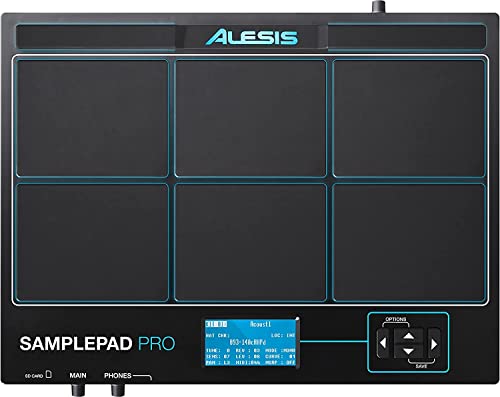
Alesis SamplePad Pro is the option I would choose for trying sample-triggered percussion without moving straight to the Roland flagship. Eight velocity-sensitive pads handle onboard sounds or samples loaded from an SD card. External pad and pedal connections allow a compact setup around it. Its tabletop footprint also fits the article better than a full rack-mounted drum kit.
Loading and organizing compatible samples requires some setup. It does not include an amplifier or a full drum kit; budget for suitable monitoring and mounting. Practice dynamics and pad placement before relying on a new setup at a show.
Pros
- An eight-pad entry into SD-based sample playback.
- Pads: 8; Sample storage: SD/SDHC card; Role: Sample triggering; Package: Pad only
Cons
- Loading and organizing compatible samples requires some setup.
| Pads | 8 |
| Sample storage | SD/SDHC card |
| Role | Sample triggering |
| Package | Pad only |

4. Pyle PTED01 Portable Digital Drum Set
Pyle PTED01 remains the basic tabletop choice for someone who wants a compact drum layout with included pedals. Its built-in speakers and headphone output let you practice without assembling a separate monitoring system. USB connectivity also provides a way to use compatible music software. This is the PTED01 package, rather than assuming all similarly named Pyle tabletop drums are interchangeable.
It is a practice-oriented instrument rather than a substitute for the playing feel of a full-size kit. Check the manual for power and computer connection requirements. The small foot controls are less realistic than full kick and hi-hat hardware.
Pros
- A tabletop practice kit with pads and foot controls.
- Format: Tabletop drum set; Monitoring: Built-in speakers and headphones; Connection: USB
Cons
- It is a practice-oriented instrument rather than a substitute for the playing feel of a full-size kit.
| Model | PTED01 |
| Format | Tabletop drum set |
| Monitoring | Built-in speakers and headphones |
| Connection | USB |

5. Yamaha DD-75 - Adapter Package
Yamaha DD-75 is my tabletop choice when a familiar drum layout matters more than loading custom samples. Eight touch-sensitive pads and two included foot controls give you a compact kit for practice. Built-in speakers make it self-contained, and a headphone connection suits quieter sessions. This exact package includes drumsticks and a PA130 adapter.
The included small foot controls do not feel like full drum pedals. It also lacks the user-sample workflow of a sampling pad. Check the package carefully: another DD75 listing omits the power adapter.
Pros
- Eight playable pads in a compact practice setup.
- Pads: 8 touch-sensitive; Included: 2 pedals, sticks and PA130 adapter; Monitoring: Built-in speakers; headphones; Role: Tabletop practice
Cons
- The included small foot controls do not feel like full drum pedals.
| Pads | 8 touch-sensitive |
| Included | 2 pedals, sticks and PA130 adapter |
| Monitoring | Built-in speakers; headphones |
| Role | Tabletop practice |
Conclusion
My bandmates and I struggled to record drums at home because it required using multiple mics. Recording the real drum kit was a hassle.
Electronic pads can simplify practicing and recording, but check whether you need audio outputs, MIDI data or both. Choose the instrument around the sounds, layout and connections you will use.