
Studio monitors should top your list for a music studio setup. Hearing your music accurately is crucial for making the right production and mixing choices. It’s an essential part of music production!
Starting a home studio can be pricey. That’s why finding budget options, especially for studio monitors, is crucial. Here are 7 of the best budget studio monitors available right now, though many other great brands and models exist.
My top pick is the JBL Professional 305P MkII. It provides balanced inputs and useful room controls in a powered nearfield monitor. The standard listing is one speaker, so allow for two units when comparing stereo-system cost.
My budget pick is the Mackie CR3.5 Pair. If you’re after an even more affordable yet satisfying option, these are a pretty well-rounded set.
The 7 Best Budget Studio Monitors (2026)


Let’s compare these in more detail.

1. JBL 305P MkII
The JBL 305P MkII is a powered monitor with a 5-inch woofer and 1-inch tweeter. Standard listings are for one unit, so buy two for a stereo setup. The larger 306P and 308P are separate models, not different woofer options inside the 305P. Balanced XLR and TRS inputs suit an audio interface.
Adjust input sensitivity and fine-tune your sound using the HF TRIM switch located on the back.
Boundary EQ adjusts low-frequency balance for placement near a wall or work surface. The Image Control Waveguide is designed to support a broad listening area. These features are useful, but positioning and room acoustics still affect what you hear; no monitor guarantees an accurate response in every room.
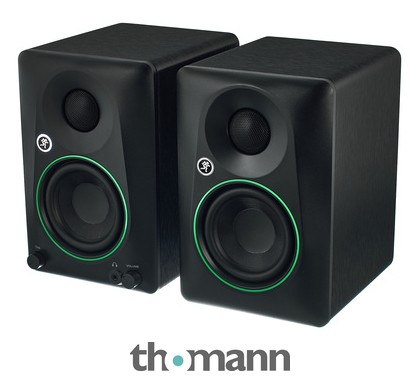
2. Mackie CR3.5 Pair
The Mackie CR3.5 updates the older CR3/CR3-X choice with a 3.5-inch woofer and tone and location controls. It is sold as a powered pair, with the amplifier in one speaker driving the other. This is the wired CR3.5, not the separate CR3.5BT Bluetooth version.
The tone knob changes the balance from the setting Mackie recommends for mixing toward a more bass-and-treble-emphasized playback sound. The desktop/bookshelf switch adjusts the intended listening setup. Keep those settings consistent when evaluating a mix rather than changing them to make every song sound more exciting.
TRS, RCA and 3.5mm inputs accept suitable line-level sources. The front headphone connection is an output, not an input, and plugging in headphones mutes the speaker sound. Check the cable you need for your interface and the active-to-passive speaker link included in the package.
The small format suits a desk used for editing, listening and gaming as well as basic production. It cannot reveal the deepest bass like a larger monitor system. Use familiar reference tracks and another playback system when judging low-end balance.
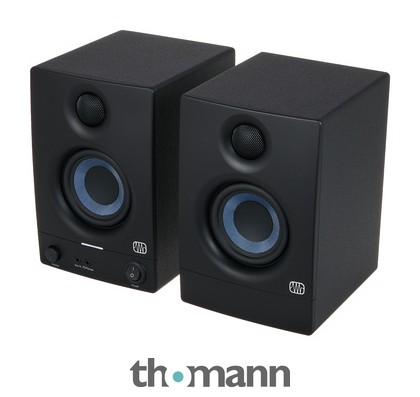
3. PreSonus Eris 3.5 2nd Gen Pair
The PreSonus Eris 3.5 2nd Gen is the current compact powered-pair option here. It replaces the older E3.5 listing. Its desk-friendly size and connection choices are useful for a modest setup, with one powered cabinet supplying both speakers.
Each speaker has a 3.5-inch low-frequency driver and 1-inch tweeter. The front provides AUX input, headphone output and level control, with TRS and RCA inputs at the rear. High- and low-frequency tuning controls allow limited adjustment for the setup.
The tuning controls can help adjust tonal balance, but they cannot remove room reflections or turn a small speaker into a full-range system. This wired model does not include Bluetooth. Confirm the exact 2nd Gen variant when comparing it with the similarly named older E3.5 or current BT version.
The amplifier is rated at 50W total, or 25W per speaker. That is a power specification rather than a promise of deep bass or louder playback than every competing pair. It remains a useful compact choice for modest-volume editing and practice with realistic low-frequency expectations.
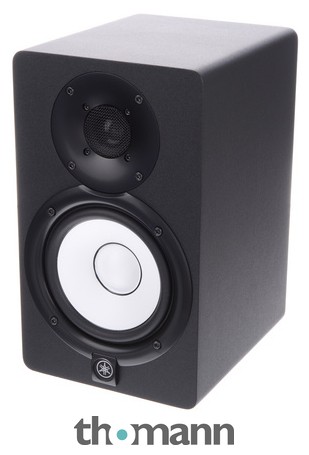
4. Yamaha HS5
The Yamaha HS5 is a current powered nearfield monitor with a 5-inch woofer and 1-inch tweeter. The HS series follows Yamaha’s reference-monitor tradition, but it is not a renamed 1970s HS model. Standard listings are for a single speaker; compare the cost of two matching units.
Its bi-amplified design provides 70W total, split between the low- and high-frequency drivers. Room Control, High Trim and input-level controls help configure the monitor. Check the placement guidance rather than assuming the rear adjustments will correct every room problem.
Balanced XLR and TRS inputs suit an interface with separate left and right line outputs. The HS5 has no front headphone socket or Bluetooth convenience features. Choose it for a dedicated wired setup and budget for the cables, stands and room arrangement as well as the speakers.

5. KRK ROKIT 5 G5
The KRK ROKIT 5 G5 updates the previous G4 choice with a 5-inch woofer, 1-inch silk-dome tweeter and three voicing modes. Mix, Create and Focus provide different listening approaches. Standard listings are for one powered speaker, so a stereo setup needs two.
The rear display provides access to onboard DSP EQ, with 25 boundary and tuning combinations. The KRK app offers setup tools; it is not a Bluetooth remote-control connection for changing the monitor’s EQ. Settings still need to suit the listening position and room.
A balanced XLR/TRS combination input accepts an interface line output. Consider this model if the onboard EQ and voicing options help your workflow. An existing G4 can remain useful: the new modes and tweeter design are reasons to compare versions, not a reason every owner must replace working monitors.

6. Edifier R1280T Pair
The Edifier R1280T is a powered bookshelf pair for everyday listening. It stays on this budget list as a secondary playback reference, with a different purpose from dedicated nearfield mixing monitors. Its wood-look finish and simple controls may suit a mixed-use desk.
Two RCA input pairs accept suitable analog playback sources, and volume, bass and treble controls adjust the sound. These are wired speakers without Bluetooth, balanced TRS or XLR inputs. An interface may need an appropriate line-output cable rather than the cable used for the dedicated monitors above.
Use the R1280T to hear how a mix translates to ordinary listening speakers, or for a room where playback matters more than critical mixing. Its bookshelf design and tone controls should not be presented as proof of a neutral studio response. Keep a familiar reference track handy when comparing the balance.
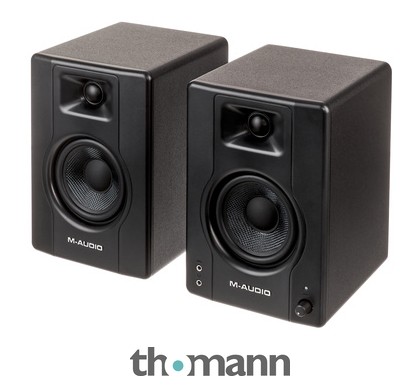
7. M-Audio BX4 Pair
The M-Audio BX4 is a powered pair aimed at desktop creation and listening. It combines 4.5-inch low-frequency drivers with 1-inch silk-dome tweeters in MDF cabinets. The wired BX4 considered here is distinct from the BX4 BT version.
Rear balanced TRS and RCA inputs accept line-level sources, with a front AUX input and headphone output for convenience. High and low controls adjust tonal balance. The active speaker drives the second cabinet through the included speaker connection; this is a pair rather than two independently amplified monitors.
These connections make the BX4 useful for editing, backing tracks and everyday desk playback. M-Audio’s advertised 120W figure should not be treated as an independently measured continuous-output comparison. Small cabinet size and driver diameter still limit the low-frequency information it can reproduce.
Choose the BX4 if its wired connections and headphone convenience fit your setup. Check the current package and required interface cable, then compare familiar tracks at a sensible level. Its suitability depends on the room and listening task rather than a blanket promise of superior sound or durability.
Do you need two studio monitors?
I recommend using two studio monitors. You can’t hear stereo sound with just one. Getting a pair ensures you’re not stuck with mono sound.
Can you use studio monitors to listen to music?
If you’re producing music, you should listen through studio monitors to train your ears to their sound. They have a different frequency range and response, so it’s essential to get used to them. Studio monitors offer distinct audio characteristics, making ear training crucial.
Studio monitors can also be enjoyable listening speakers. Their design goals generally emphasize revealing the recording, but the room, placement and individual model still shape the response. Compact nearfield models may not reproduce the deepest bass, so choose the system for the task rather than assuming the label makes it flat.
Do I need studio monitor stands?
Use suitable stands or supports to place the tweeters near ear height and keep the speakers stable. Isolating mechanical vibration can help with a resonant surface. Positioning also matters because a desk can reflect sound toward the listener.
Comb filtering comes from direct and delayed reflected sound interfering, producing peaks and dips in the response. It is not simply another name for cabinet vibration. Reducing desk and wall reflections through placement and suitable treatment helps; a stand alone cannot guarantee the problem disappears.
How does room treatment affect the sound of studio monitors?
The sound quality in your room makes a big difference. Even with pricey studio monitors, you need to treat the room. This means reducing sounds that bounce or reflect off walls. In an untreated room, getting accurate bass can be challenging.
Room treatment is essential for an effective studio setup. If you’re investing in studio monitors, you should also focus on acoustically treating your workspace. Research this topic thoroughly to get the best results.
Should I get Headphones or Studio Monitors?
Studio monitors let both ears hear a stereo speaker system in the room, while headphones provide a different perspective. Closed-back headphones can help when isolation matters, but not every headphone design isolates. Use both familiar reference material and more than one listening system where possible.
Depending on your budget, I’d recommend having a good pair of studio headphones for better isolation while mixing. Plus, if you have neighbors, headphones help avoid disturbing them during late-night work.
What is the optimal Monitor Placement/Positioning?
The best setup for studio monitors is placing one on each side of your computer. This forms a triangle so the distance between you and each monitor is equal.
Keep the listening position centered, with the speakers aimed toward you and the tweeters around ear height. Avoid placing one speaker in a corner and the other in open space if possible. Start with the manufacturer’s placement guidance, then assess how the actual room changes the sound.
What to look for in Studio Monitors when buying?
Studio monitors are crucial for music production, so spend time selecting the right ones and making a safe purchase.
Sound quality should be a priority, but monitors do not capture sound or automatically reproduce deeper bass than all ordinary speakers. Compare their usable response, inputs, listening distance and behavior at the volume you need. Acoustic treatment and consistent placement matter alongside the model.
Secondly, a good studio monitor speaker also needs to be durable and have sturdy components to last a decent amount of time! For the best affordable studio monitors, you need to consider and research durability, as the best cheap doesn’t mean the overall best studio monitors.
Obviously, you need to consider your budget and avoid spending too much on your recording studio. It’s smart to save some money for quality audio interfaces or invest in room acoustics.
Useful extra features depend on the task. A front headphone output can help on a shared desk, while balanced inputs are useful for an audio interface. Bluetooth can be convenient for playback, but a wired connection avoids that link’s latency when recording or monitoring live performance.
Summary
To make reliable decisions, learn how familiar recordings sound on your setup and compare your mixes against them. These budget options cover compact desktop pairs and dedicated nearfield monitors, with different limitations. Allocate the budget to the complete listening setup rather than assuming one purchase guarantees an accurate mix.
My top recommendation is the JBL Professional 305P MkII for a dedicated wired nearfield setup. Compare the price of a stereo pair, its balanced inputs and the available room controls with your space and interface.
I would consider the Mackie CR3.5 Pair for a tighter-budget desk used for both editing and playback. Keep its tone setting consistent for mix decisions and remember that a compact pair will not reveal the deepest bass.