
An audio mixer combines microphone, instrument and line signals for a performance or recording. Choose a stereo USB mixer for capturing a finished mix, or a multitrack mixer-recorder when you need to edit each source separately. A powered PA head serves a different role: driving suitable passive speakers.
There are many mixers on the market which can be overwhelming and confusing to choose the best one. A standard analog mixer is usually cheaper and easier to use. A digital mixer is more complicated and versatile as it converts analog signals to digital signals before processing them with a variety of features including presets, effects, automation, and other functions.
My top audio mixer recommendation is Mackie ProFX12v3, a compact analog desk for small live setups and stereo USB recording.
For tighter budgets, I suggest the Behringer Xenyx X1222USB, an analog audio mixer with a great value for the offered price and simple yet reliable features.
The 7 Best Audio Mixers for Recording, Mastering, and Mixing (2026)

Let’s compare these in more detail.

1. Mackie ProFX12v3
Mackie ProFX12v3 remains my straightforward choice for small rehearsals, live performances and recording a stereo mix. It has seven Onyx microphone preamps, four one-knob compressors and the GigFX effects section. Physical faders make level changes easy to follow. Its USB interface is useful for capturing the mix and playing audio back from a computer; it does not turn each input into an independent recording track.
This is an analog mixer with digital effects and a 2-in/4-out USB interface, not a digital mixing console. Choose the Zoom if separate recording tracks and several headphone mixes are essential.
Pros
- A compact analog mixer with USB recording and onboard effects.
- Inputs: 12-channel format; 7 microphone preamps; USB interface: 2-in/4-out; Effects: GigFX; 24 effects; Compressors: 4 one-knob channel compressors
Cons
- This is an analog mixer with digital effects and a 2-in/4-out USB interface, not a digital mixing console.
| Inputs | 12-channel format; 7 microphone preamps |
| USB interface | 2-in/4-out |
| Effects | GigFX; 24 effects |
| Compressors | 4 one-knob channel compressors |
2. Behringer Xenyx X1222USB
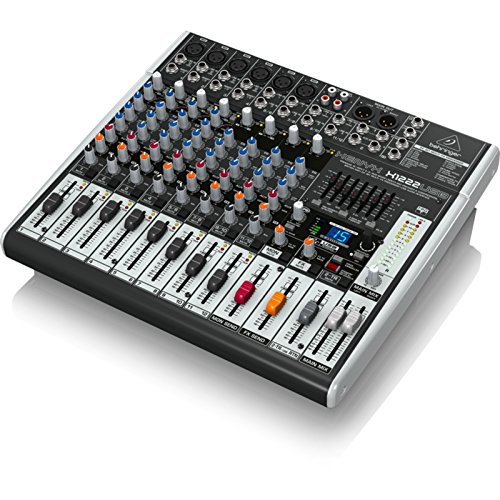
Behringer Xenyx X1222USB is the budget option for mixing a few microphones and line sources into a stereo output. Six Xenyx microphone preamps, channel compression and a graphic EQ give you useful tools for a small live setup. The onboard effects handle basic reverb and delay without requiring another unit. I would choose it for an uncomplicated performance mix rather than detailed multitrack production.
USB carries a stereo mix rather than separate tracks for every input. Count the microphone sockets you need instead of treating the advertised total input count as the number of microphones you can connect.
Pros
- Six microphone preamps and simple stereo USB recording.
- Microphone preamps: 6; USB recording: Stereo; Channel EQ: 3-band; Main EQ: 7-band graphic EQ
Cons
- USB carries a stereo mix rather than separate tracks for every input.
| Microphone preamps | 6 |
| USB recording | Stereo |
| Channel EQ | 3-band |
| Main EQ | 7-band graphic EQ |

3. Allen & Heath ZED-14
Allen & Heath ZED-14 suits a small band or hardware studio that values routing and physical controls more than onboard effects. Six mono channels use DuoPre microphone preamps, while four stereo channels accommodate keyboards and playback devices. Four auxiliary sends provide more flexibility for monitor mixes or external processing than the simplest compact mixers. Its long faders make gradual changes easy to manage.
There are no built-in effects. The USB connection is for stereo recording and playback, not independent recording of all fourteen inputs. Allow space for a full-size desk rather than expecting a pocket mixer.
Pros
- A hands-on analog desk with six mic inputs and four stereo inputs.
- Inputs: 6 mono plus 4 stereo channels; Aux sends: 4; Effects: No onboard effects; USB: Stereo audio interface
Cons
- There are no built-in effects.
| Inputs | 6 mono plus 4 stereo channels |
| Aux sends | 4 |
| Effects | No onboard effects |
| USB | Stereo audio interface |

4. Yamaha MG12XU
Yamaha MG12XU remains a practical choice for a small band, vocal group or home setup that needs a clear physical signal path. It has six microphone inputs, four mono channels and four stereo-capable channels, with the available input combinations determining what can be used together. One-knob compressors and the SPX processor cover common live needs. Its stereo USB interface can capture your performance or bring backing audio into the mix.
The 2-in/2-out USB interface does not record each mixer channel separately. Check the manual’s socket combinations before buying for a large microphone setup. Leave ventilation around the mixer during use.
Pros
- A compact analog mixer with D-PRE preamps and SPX effects.
- Format: 12-channel analog mixer; Microphone inputs: Up to 6; USB: 2-in/2-out; up to 24-bit/192 kHz; Effects: SPX; 24 programs
Cons
- The 2-in/2-out USB interface does not record each mixer channel separately.
| Format | 12-channel analog mixer |
| Microphone inputs | Up to 6 |
| USB | 2-in/2-out; up to 24-bit/192 kHz |
| Effects | SPX; 24 programs |
5. PreSonus StudioLive 16.0.2 USB
PreSonus StudioLive 16.0.2 USB suits a player who wants digital processing and separate recording tracks in a compact console. Its twelve microphone preamps, stereo input channels and Fat Channel controls cover compression, EQ and routing without filling the desk with outboard processors. Scene recall is helpful when returning to a familiar setup. The exact USB edition is the relevant model here, rather than the older FireWire console.
Its faders are not motorized. Check current driver and operating-system compatibility before planning a computer-based setup around this older design. Digital routing also requires more learning than a basic analog desk.
Pros
- A compact digital mixer with multitrack USB and Fat Channel processing.
- USB interface: 16-in/16-out; Microphone preamps: 12; Processing: Fat Channel; two effects buses; Faders: Non-motorized
Cons
- Its faders are not motorized.
| Model | StudioLive 16.0.2 USB |
| USB interface | 16-in/16-out |
| Microphone preamps | 12 |
| Processing | Fat Channel; two effects buses |
| Faders | Non-motorized |

6. Zoom LiveTrak L12next
Zoom LiveTrak L12next is my choice for recording a rehearsal without relying on a computer. Its twelve-channel layout, microSD recording and five headphone outputs suit a group that needs individual monitor mixes. It records fourteen tracks including the stereo mix, and also works as a 14-in/4-out USB interface. The newer model’s touchscreen, recall and remote-control options make it more flexible when revisiting a session.
It is a mixer-recorder rather than a complete mastering workstation. Its 32-bit float recording cannot fix microphone overload, poor placement or excessive analog input level. You still need an appropriate microSD card and a sensible gain setup.
Pros
- A standalone recorder and mixer with five independent headphone mixes.
- Recording: 14 tracks to microSD; 32-bit float; USB interface: 14-in/4-out; Headphone outputs: 5 independent monitor mixes
Cons
- It is a mixer-recorder rather than a complete mastering workstation.
| Model | LiveTrak L12next |
| Recording | 14 tracks to microSD; 32-bit float |
| USB interface | 14-in/4-out |
| Headphone outputs | 5 independent monitor mixes |
7. Peavey PVi 6500
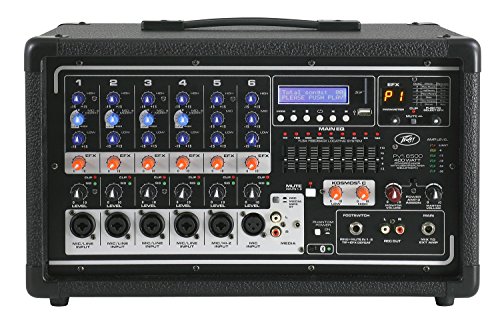
Peavey PVi 6500 is the specialist pick for someone who already owns suitable passive PA speakers. It combines six input channels, an onboard power amplifier, digital effects and feedback-management tools in one head. Bluetooth and media playback can cover backing music without another player. Keep this option for simple live vocals and instruments rather than treating it as an alternative to the USB recording desks.
Match the speakers to the amplifier’s load requirements and rated output. The USB media player is not a multichannel USB audio interface, and this head is less suitable for a studio built around powered monitors.
Pros
- A powered PA head for a small passive-speaker setup.
- Input channels: 6; Format: Powered PA mixer; Effects: Digital reverb and delay; USB: Media playback; not a recording interface
Cons
- Match the speakers to the amplifier’s load requirements and rated output.
| Input channels | 6 |
| Format | Powered PA mixer |
| Effects | Digital reverb and delay |
| USB | Media playback; not a recording interface |
How does an Audio Mixer work?
An audio mixer receives microphone, instrument and line signals, then routes and combines them through its mixing circuits. Meters show signal level; they do not mix the audio. Outputs send the selected mix to speakers, headphones or recording equipment.
A standalone audio mixer allows you to connect microphones, instruments, and other line-level audio sources to itself. On the mixing console panel, you can blend all different audio sources into one audio stream. Depending on the features of the mixer, you can control the volume of individual audio signals customize the EQ and panning.
Some audio mixers also have built-in effects like compression, reverb, and delays which you can use for each channel. After you customize all you need for each channel, through an output, the blended stereo signal is sent to the desired output device such as headphones, PA system, or speakers.
Some audio mixers also have built-in audio interfaces, which allow you to connect them to your computer, often with a USB cable, to record your mix your DAW.
What is the difference between an Audio Interface and an Audio Mixer?
An audio mixer is designed to mix, blend and balance signals from different audio sources into one stereo sound stream. Audio interfaces’ main goal is to receive signals from the audio sources and record them into the computer. Some audio mixers come with built-in audio interfaces for recording.
How important are built-in effects?
Built-in effects in an audio mixer make everything more convenient for users. Although you can get your effects from additional gear, and it is not ultimately necessary to have them in a mixer, having basic effects like compression, reverb, and delay onboard make everything easier.
How long do Audio Mixers last?
Service life depends on construction, storage, maintenance and use. Protect sockets and faders, keep ventilation clear and check support for any computer drivers the mixer needs.
What to look for in an Audio Mixer?
When buying an audio mixer, the key features you should check are the channel count, EQ, effects, portability, compatibility, and connectivity. To find the ideal audio mixer for your needs, you should consider the questions; with how many audio sources, how and where you will use the audio mixer.
Channel Count
Arguably the most critical feature of an audio mixer is the channel count. Depending on how you will use the audio mixer, you will need a different number of channels. If you are mixing some microphones for podcasts, you can go with a small audio mixer with a limited number of channels; however, if you will be working with music bands, for instance, you need a big audio mixer with a high number of channels.
EQ
Choose channel EQ and routing that suit your sources. A separate master graphic EQ can help some live setups, but it is not a requirement for every recording mixer.
Effects
Although you can get your effects from other devices or plug-ins, it is highly convenient to have at least basic effects on your audio mixer. Effects like compression, delay, and reverb are commonly found on most audio mixers.
Portability
Portability becomes crucial if you use the audio mixer outside the studio for live gigs or recordings. A lightweight, compact device would serve you better when carrying it around. Of course, in that case, you should also consider the construction quality, as you would not want it to be easily damaged or broken. But, if you will be using the mixer mainly in the studio without moving it often, you can skip this aspect.
Compatibility
Another critical point is the compatibility of the audio mixer. Suppose you want to use the device connected to computers or smart devices, especially those with built-in audio interfaces. In that case, you should check if the device is compatible with your computer, smart device, and operating system.
Some audio mixers are well integrated with some particular DAWs, which can be another plus if you want to use that particular DAW.
Connectivity
And finally, the connection types and number of input-output ports are also important. If you are using many mics, you should go for a mixer with enough mix preamps and phantom power if necessary. If you use many line-level sources, you should ensure the mixer has enough line inputs.
Plus, the number of outputs is also important; besides the main output, you might need additional aux sends for stage monitors, some inserts or effect sends for outboard effects processors, and also a headphone out to listen to your mixes.
Conclusion
There are many different audio mixers on the market with different features answering different needs. To get the most suitable one for yourself, you should decide your needs and go for a high-quality, versatile one that would serve you well.
My top pick is Mackie ProFX12v3, a straightforward analog mixer for a small live setup or stereo recording. Choose the Zoom for separate tracks and individual headphone mixes.
For tighter budgets, I recommend the Behringer Xenyx X1222USB, a reliable analog audio mixer for home studios and basic live performances.