
The piano remains one of the most popular instruments. With electronic music’s rise, integrating keyboards and computers is now essential in any musician’s studio. Using a full 88-key piano paired with MIDI controllers offers the best of both.
With so many keyboards available, choosing the right one can be overwhelming. That’s why I’ve created a list of the 7 best 88-key MIDI keyboards to help simplify your decision.
My top recommended pick is the Arturia KeyLab 88 mk3 Black. This versatile, high-quality keyboard offers excellent value for money.
My second pick is the M-Audio Keystation 88 MK3 for those on a budget who still want an 88-key keyboard.
The 7 Best 88-Key Midi Keyboards (2026)


Let’s compare these in more detail.
1. Arturia KeyLab 88 mk3 Black
The Arturia KeyLab 88 mk3 stands out for its versatility. Its Fatar TP/110 hammer-action keybed, aftertouch and color display combine piano-oriented playing with software control. Choose the exact KeyLab 88 model here: the similarly named Essential 88 has a different key mechanism and is not an interchangeable version of this recommendation.
Nine faders, nine rotary encoders and 12 pads provide hands-on control, while chord, scale and arpeggiator functions help develop parts. For example, you can play a piano track across the full keyboard, then use the pads for drum notes and the faders for a supported mixer layout. Configure the appropriate DAW script before relying on automatic mapping.
Its MIDI connections and pedal inputs make it useful beyond a basic USB-only setup. Software sounds still run on a connected computer or other sound source; the controller does not produce an acoustic-piano sound by itself. Check the current registration bundle and the software requirements for your computer before relying on the included instruments.
This remains my top pick for players who want piano-oriented action together with studio controls. The tradeoff is the space and transport burden of a full hammer-action instrument. Try the key resistance if possible and measure the stand before ordering. The video demonstrates the previous KeyLab 88 MkII, so its panel layout should not be used as a guide to the mk3.
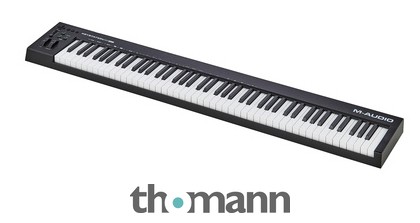
2. M-Audio Keystation 88 MK3
The M-Audio Keystation 88 MK3 is a beginner-friendly keyboard that gives you a full playing range without a large production-control panel. Its semi-weighted keys differ from the heavier hammer mechanisms elsewhere on this list. That can suit a player switching between piano parts, synth lines and software instruments, but it is not the same touch as an acoustic piano.
Pitch and modulation wheels, a data slider and octave controls cover the essentials. You can play a two-handed arrangement without shifting octaves, then assign the slider to a useful instrument parameter. It has no bank of drum pads or mixer faders, so choose one of the more elaborate controllers if those are central to your recording workflow.
USB provides power and MIDI to a computer, and the class-compliant connection does not require a dedicated MIDI driver. For an external hardware sound module, use the MIDI output and the specified power arrangement. Do not assume the optional power supply, sustain pedal or mobile-device adapter comes in every retail package; inspect the exact contents before ordering.
The current registration process redeems the included software through the inMusic Software Center. Check the applications' own operating-system requirements as well as the controller connection. This remains my budget pick because its simple layout leaves fewer controls to learn, provided you already have a computer instrument or external module to supply the sound.
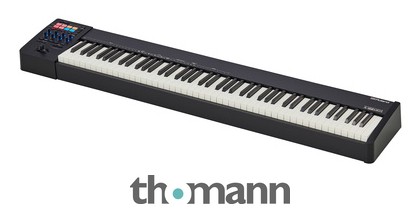
3. Roland A-88MKII
The Roland A-88MKII is an 88-key controller with Roland's PHA-4 Standard hammer-action keybed. Its shallow enclosure helps when fitting a piano-oriented controller into a studio desk. The key action and wood-based construction make it a different proposition from the lighter semi-weighted choices, although the right touch still depends on the player.
Eight assignable pads and eight knobs accompany Roland's combined pitch/modulation lever. Three zones let you split or layer sounds, which is useful for placing a bass sound under the left hand and a piano or pad above it. The arpeggiator and chord memory provide additional options without requiring a larger bank of mixer faders.
The control application manages assignments and recallable setups. MIDI2 support requires system software version2 or later and a compatible receiving setup; a USB-C socket alone does not guarantee that every instrument uses the newer protocol. Confirm the current firmware and the chosen host application's capabilities before building a performance around that feature.
USB can supply power in supported computer configurations, while some mobile connections require the optional AC adapter. This is a strong choice for players prioritizing piano action and zoned performance control. Its full-width body still needs a suitable stand and transport plan. The controller sends performance data, so a computer instrument or sound module remains part of the complete rig.
4. Nektar Impact LX88 mk3
The Nektar Impact LX88 mk3 combines a full playing range with a studio-control panel. The 88-key version uses a semi-weighted piano-style mechanism, rather than the synth-action mechanism specified for the smaller mk3 models. It is worth distinguishing those versions when comparing product descriptions or watching demonstrations of the wider range.
Eight pads, eight faders and rotary controls give you a useful combination for playing instruments and adjusting a project. Nektar's integration software supports specific DAWs, and NKS control works with compatible software instruments. A MIDI connection alone does not install those mappings: follow the instructions for your actual DAW version and register the hardware where required.
Scale, chord and hold functions can help sketch a part, while the pedal input provides sustain control. USB-C handles the computer connection and power; check the current model's ports instead of assuming an older LX88+ power connection or MIDI socket is present. Save a straightforward working preset before experimenting with several layers of assignments.
This is a useful middle ground when a plain keyboard feels too limited but hammer action is unnecessary. Its panel can reduce mouse work for recurring tasks such as track levels and instrument parameters. It still needs a host or sound module for audio. The retained LX88+ video provides previous-generation background and does not show the mk3's exact controls or connectivity.
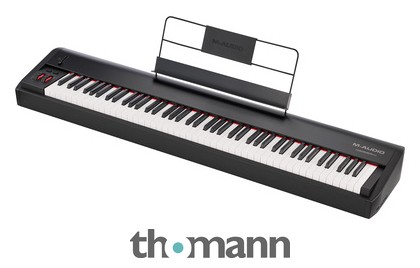
5. M-Audio Hammer 88
The Hammer 88 concentrates on a fully weighted hammer-action keyboard rather than a crowded control surface. Its metal enclosure and substantial key mechanism make it a studio or performance instrument that deserves a suitable stand. Treat it as a full-size load when planning transport, rather than assuming that the word controller means it will be easy to carry.
Pitch and modulation wheels, a volume slider and assignable buttons cover basic expression and selection tasks. The editor can configure keyboard zones and assignments. For a piano part, start with a suitable velocity response in the software instrument, then use the pedal and slider controls you actually need instead of mapping every available function at once.
MIDI output allows connection to external sound hardware, and the sustain, expression and soft-pedal inputs support a more piano-oriented setup. USB handles computer MIDI and power. A stand-alone hardware rig needs the prescribed power arrangement as well as a sound source; the absence of a laptop does not turn the controller into a digital piano.
This remains a sensible choice if key action matters more than clip launching, drum pads or detailed mixer control. The Hammer 88 Pro is a separate option for those additional controls, not the same product with a minor label change. Check the current software bundle and accessory list, and try the action if possible before committing to a daily practice instrument.
6. Novation Launchkey 88 MK4
The Novation Launchkey 88 MK4 is the current full-range model in the Launchkey family. Earlier MK4 descriptions often concerned smaller keyboards, so check both the generation and key count. This is a semi-weighted controller suited to players who want a full range together with hands-on production controls, rather than a heavy hammer-action mechanism.
Its faders, encoders and 16 pads combine instrument performance with mixer and clip tasks. The display provides feedback when changing functions, while scale, chord and arpeggiator tools offer different ways to develop ideas. Pad pressure support should not be confused with aftertouch on the main piano-style keys; compare those capabilities separately if pressure expression is important.
Novation supplies integration for supported DAWs, with custom control options available through Components. Install the appropriate setup and update guidance for your application instead of assuming every DAW maps identically. USB-C, MIDI output and a sustain-pedal connection make it usable with computer instruments and compatible external sound hardware, subject to the required power and routing arrangement.
This is a useful studio-and-live choice for musicians who regularly move between playing parts and controlling a project. Review the current software registration bundle rather than expecting every title from an older MK3 promotion. The video demonstrates the prior MK3: its panel and software package are historical context, while the recommendation and purchase routes here identify the MK4.

7. Studiologic SL88 MK2
The Studiologic SL88 MK2 combines a Fatar TP/110 hammer-action mechanism with aftertouch and performance zoning. This recommendation is the standard SL88 MK2, not the heavier GT model with its different wooden key mechanism. It retains the appeal of a piano-oriented controller that can serve both a studio desk and a transportable performance setup.
Four programmable zones provide split and layer control, while the revised display, encoders, transport buttons and two sticks replace the older Studio's three-stick layout. Set up only the zones needed for a song and confirm their MIDI destinations. That is more useful than sending every layer to the same instrument and wondering why notes trigger twice.
A significant addition is its USB-C audio connection, with line and headphone outputs for a connected computer or mobile device. Those outputs carry the host's sound; they do not imply an internal stand-alone piano engine. Numa Player integration supplies a software route for playing, and MIDI2 functionality still depends on compatible firmware and receiving software.
The standard model is a good fit when hammer action and performance zoning matter more than a large pad bank. Pedal settings include polarity and range configuration, which is useful when integrating an existing setup. Check accessory compatibility because the newer magnetic fittings differ from previous SL products. The video shows the older SL88 Studio and should be treated as background rather than a current panel walkthrough.
How many keys is best for a MIDI keyboard?
Depending on what you play and the setting, keyboard size varies. For one-handed synths, leads, live performances, and beat-making, a smaller, 25-key MIDI keyboard works. For two-handed playing and a popular option for gigs and studio use, go with a 49-key keyboard. For piano arrangements or more versatility, opt for a 61, 73, or 88-key keyboard.
Conclusion
Keyboards are essential today, whether you’re a pro musician or forming a cover band. Thankfully, there are plenty of options, with a range of prices to suit musicians of any skill level.
My top pick is the Arturia KeyLab 88 mk3 Black. This high-quality, versatile keyboard offers superb value for money.
My budget pick is the M-Audio Keystation 88 MK3. If you don’t want to break your pockets, the M-Audio Keystation will get the job done. Its 88 keys provide a full playing range; a connected software instrument or sound module supplies the audio.