
A cassette-to-MP3 converter lets you copy tape recordings to digital files. The simplest choice depends on whether you want to record on a computer, save straight to a USB drive, or use a cassette deck you already own.
My top pick is the Reshow Cassette Player for occasional transfers on a computer. It combines a portable tape player with USB capture.
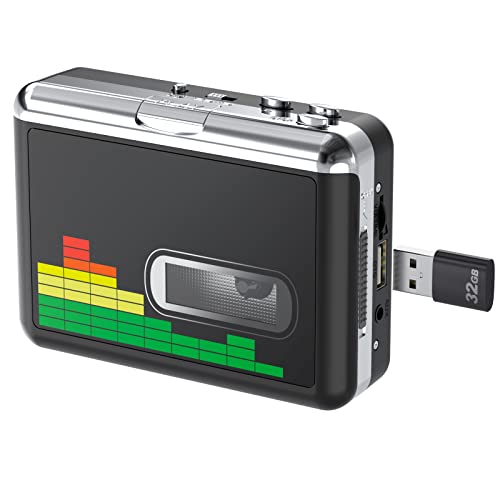
For a computer-free transfer, choose the DIGITNOW USB Cassette Player BR607. It records MP3 files directly to a USB flash drive.
The 4 Best Audio Cassette to MP3 Converters (2026)



Let’s compare these in more detail.
1. Reshow Cassette Player
Pros
- Cassette player and USB capture in one device
- Compact enough for occasional transfers
- 3.5 mm headphone output
Cons
- Needs a computer and recording software
The Reshow Cassette Player remains my top pick for a small collection when you want the tape player and USB capture in one compact unit. The silver model connects to a computer, where recording software captures the cassette audio. It also has a 3.5 mm output for listening through headphones.
Insert the tape, select the USB device as your recording input and make a short test recording before transferring a whole side. Listen for distortion and confirm that both stereo channels are present. Once recorded, you can trim the ends, divide tracks and export MP3 files in the software.
I would choose this for straightforward home transfers rather than buying a separate deck and interface. It does require a working computer setup, and the quality of the original tape and the player’s transport still matter. A quiet room will not remove hiss already recorded on a cassette.
| Model | R-CP18S; silver |
| Recording route | USB to a computer |
| Computer required | Yes |
| Listening output | 3.5 mm headphones |
2. DIGITNOW USB Cassette Player BR607
Pros
- Saves directly to a USB flash drive
- Automatic or manual track division
- Auto-reverse playback
Cons
- Fixed MP3 recording settings limit editing flexibility
The DIGITNOW BR607 is my second choice for people who want to convert tapes without setting up a computer. Insert a compatible USB flash drive, start the cassette and record directly to MP3. The drive and AA batteries are separate purchases.
It provides automatic and manual track division, volume control and auto reverse. The automatic mode uses pauses to separate songs, so check the resulting files: a quiet passage or a live recording without clear gaps can need manual correction. Listening to a test transfer before leaving a valuable tape running is worthwhile.
DIGITNOW specifies 32 kHz sampling and 128 kbps MP3 recording. That is convenient for ready-to-play files, but a computer-based workflow gives you more choice over capture format and later editing. Choose the BR607 for convenience when you do not need to keep an uncompressed master recording.
| Model | BR607 |
| Recording destination | USB flash drive |
| Computer required | No |
| MP3 recording | 32 kHz; 128 kbps |
| Power | USB or two AA batteries |
3. Focusrite Scarlett 2i2 4th Gen USB Audio Interface
Pros
- Uses a cassette deck you already own
- Two line inputs for stereo recording
- Also useful for other home-studio recording
Cons
- Needs a working deck, suitable cables and a computer
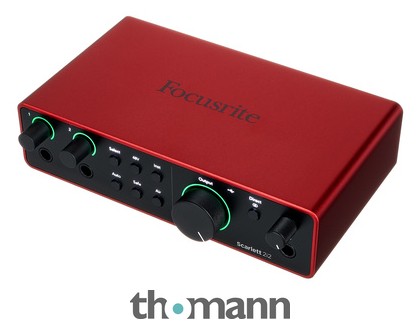
The Focusrite Scarlett 2i2 4th Gen is the option I would choose if I already owned a cassette deck worth keeping. It is an audio interface, not a cassette player. You supply the deck, the computer and suitable cables, then use the two line inputs to record the deck’s left and right outputs.
For a deck with RCA outputs, use a pair of RCA-to-1/4-inch cables and set the interface inputs to line rather than instrument mode. Record the inputs as a stereo track in your software. Keep the two gain settings matched and leave room below clipping; extra gain will not repair a weak or damaged source tape.
This route gives you control over recording levels, editing and export format. The 2i2 supports recording up to 24-bit/192 kHz, but high sample rates cannot recover detail the tape never captured. Save an uncompressed recording before making MP3 copies. If you already own a suitable stereo interface, try that before buying another one.
| Generation | Scarlett 2i2 4th Gen; interface only |
| Cassette playback | Requires a separate deck |
| Stereo input route | Two 1/4-inch line inputs |
| Recording destination | Computer software |

4. TASCAM 202MKVII Dual Cassette Deck with USB
Pros
- Dedicated dual-deck controls
- USB audio output for computer recording
- Pitch control on the first deck
Cons
- Large mains-powered unit
- Requires computer recording software
The TASCAM 202MKVII makes sense for a larger cassette collection or a setup where a full-size deck will stay in regular use. Its two cassette wells support playback and recording, and the USB audio output sends the sound to a computer without a separate audio interface.
You still need recording software. The USB connection carries audio; it does not write MP3 files directly to a flash drive. Capture the transfer in a format such as WAV, keep that as your master, and export MP3 copies afterward. The USB output supports up to 16-bit/48 kHz audio.
Pitch control on the first deck helps adjust playback speed, and the two decks can also copy a cassette at normal speed. It takes much more space than the portable players above and needs mains power. For a handful of tapes, the Reshow or DIGITNOW is easier to accommodate; for repeated transfers, the TASCAM offers dedicated deck controls and a permanent place in the setup.
| Model | 202MKVII |
| Format | Dual cassette deck |
| USB function | Audio output to a computer |
| USB recording resolution | Up to 16-bit/48 kHz |
| Power | Mains; choose the correct regional version |
How do cassette-to-MP3 converters work?
The player reads the magnetic recording on the tape, then a converter turns that audio into digital data. A USB cassette player or deck sends the audio to recording software on a computer. The DIGITNOW BR607 instead encodes MP3 files directly onto a USB flash drive.
Transfers happen at playback speed, so a 30-minute side takes about 30 minutes to record. Rewind the tape, make a short test and check the recording level before capturing the whole side. With software, save the recording, trim unwanted silence, divide tracks if needed and export your listening copies.
What to look for in a cassette-to-MP3 converter?
Start with the equipment you own. A working stereo deck can feed an audio interface; you do not need a new tape mechanism just to add USB recording. If you have no deck, a portable USB player is the smaller setup. Direct-to-drive conversion suits someone who wants MP3 files without using recording software.
Check the difference between a USB audio output and a USB recording socket. The Reshow and TASCAM send audio to a computer; the BR607 saves files on a flash drive. Also check stereo recording, monitoring, input levels and the connections your deck needs. An interface cannot improve worn tape transport or fix a damaged recording.
For recordings you want to keep, save an uncompressed WAV master where your recording setup allows it. Make MP3 copies for everyday listening, and keep a second backup in another location. Heavy noise reduction can remove wanted detail along with hiss, so keep the original transfer before editing.
Why does cassette conversion matter?
Digital copies make old recordings easier to back up, search and share, while reducing repeated handling of the tapes. Conversion preserves what the player can recover; it does not restore information that has already been lost. Keep the original cassettes after transferring them, especially when they contain unique recordings.
Summary
My top pick is the Reshow Cassette Player for a small collection and a computer-based transfer. Choose the DIGITNOW USB Cassette Player BR607 when you want files saved straight to a USB drive.
If you already have a good cassette deck, an audio interface such as the Scarlett 2i2 may be the more useful purchase. The TASCAM 202MKVII suits a larger collection when you want a dedicated deck with USB audio output.