
HDMI audio extractors take sound from an HDMI source and send it to a separate audio system while passing the video to a TV or projector. Some models also accept audio returning from a TV through ARC or eARC, but that is a separate feature to check.
An extractor can connect a source to an older amplifier, DAC or receiver that lacks the right HDMI connection. It does not automatically improve sound quality or cure lip-sync delay. Choose it around the video signal and the audio format that your destination can actually accept.
My general 4K60 recommendation is the J-Tech Digital 4K 60HZ HDMI Audio Extractor for a source-to-display setup with separate optical or stereo audio. Check the output format and remember that this model does not extract TV ARC audio.
My straightforward alternative is the OREI HDA-912. Its optical and 3.5mm outputs suit a compatible older audio system; use PCM stereo for the analog connection and compare the current complete package cost.
The 7 Best HDMI Audio Extractors (2026)


Let’s compare these in more detail.
1. J-Tech Digital JTD18G-H5CH
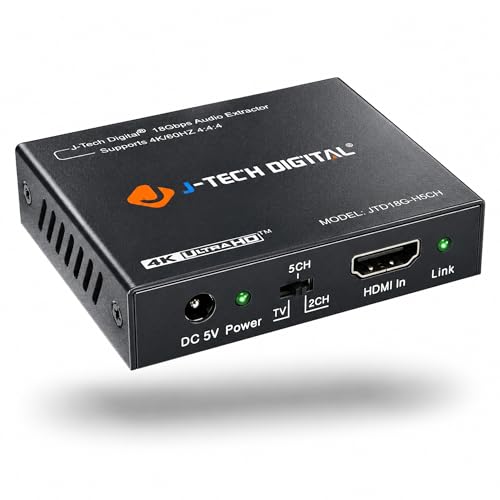
The J-Tech Digital JTD18G-H5CH, also identified as JTD-322, supports HDMI video up to 4K60 within its 18Gbps bandwidth. It has optical and 3.5mm stereo audio outputs alongside HDMI passthrough. Its HDCP 2.2 support is useful for compatible protected 4K content, but it is not an 8K or 4K120 device.
Pros
- 4K60 passthrough
- Optical and analog stereo outputs
- Three EDID modes
Cons
- No ARC
- No Dolby/DTS-to-analog decoding
Use two-channel PCM from the source for the 3.5mm analog output. Optical supports stereo PCM and compatible Dolby Digital or DTS 5.1 bitstreams, which the receiving sound system must decode. HDMI high-bit-rate audio passthrough is different from those optical capabilities: TrueHD, DTS-HD and Atmos should not be assumed to appear at the optical output.
The three EDID settings help tell the source which audio format to send. Start with stereo PCM if you get a picture but no sound through an analog connection. This unit does not provide ARC, so connect it between the HDMI source and display rather than expecting it to receive sound from the TV’s internal apps.
| Model | JTD18G-H5CH / JTD-322 |
| Video ceiling | 4K60, 18Gbps |
| Audio outputs | Optical and 3.5mm stereo |
| Analog input format | PCM stereo |
| ARC/eARC | No |
J-Tech provides product support and setup guidance for this model. Check the warranty that applies to the seller and region, and use suitable cables and power. A passthrough specification is not a promise that every combination of source, TV and audio device will negotiate correctly without adjusting settings.

2. OREI HDA-912
The OREI HDA-912 is a straightforward 4K60 HDMI audio extractor. It provides optical and 3.5mm stereo outputs while passing HDMI video to a display. It fills the basic external-source role without asking you to buy the more specialized downmixing or eARC-routing models below.
Pros
- Documented 4K60 support
- Optical and analog stereo
- Included power supply
Cons
- No ARC/eARC
- Analog output requires PCM stereo
OREI specifies 18Gbps HDMI bandwidth and HDCP 2.2. The 3.5mm output needs PCM stereo, while optical carries supported stereo PCM or Dolby Digital/DTS 5.1 to a suitable decoder. Its HDMI connection can pass additional audio formats onward, but those should not be confused with what its extracted outputs can carry.
Choose the HDA-912 when the source can be configured for the audio destination you already own. It does not convert a Dolby or DTS bitstream into analog stereo in the way the HDA-913 does. If the analog output stays silent, check the source setting before treating it as a faulty cable.
| Model | OREI HDA-912 |
| Video ceiling | 4K60, 18Gbps |
| Audio outputs | Optical and 3.5mm stereo |
| Analog input format | PCM stereo; no bitstream decoder |
| ARC/eARC | No |
The manufacturer lists a power adapter in the package. Plan space for that supply and the separate HDMI and audio cables. This is an HDMI-source extractor with no ARC/eARC feature, so it will not retrieve TV-app audio simply because it is connected to a television.

3. OREI HDA-913
The OREI HDA-913 is the more useful option here when an analog stereo system needs audio from a supported Dolby or DTS bitstream. Its manual documents downmixing to left/right RCA outputs as well as optical and HDMI passthrough. This is a functional difference from a basic PCM-only analog extractor.
Pros
- Supported Dolby/DTS stereo downmixing
- Stereo RCA connectors
- 4K60 passthrough
Cons
- No ARC/eARC
- Not every HDMI format is decoded
Its 18Gbps HDMI connection supports video up to 4K60 and HDCP 2.2. The exact manual shows RCA stereo sockets, despite inconsistent 3.5mm wording in parts of the manufacturer’s online page. Check the HDA-913 model and the connector photograph before choosing your audio cable.
The manual describes Dolby/DTS downmixing for stereo analog output, while optical remains limited to its documented stereo PCM and Dolby Digital/DTS formats. Passing TrueHD or DTS-HD through HDMI is not the same as decoding every high-resolution format to analog. Match the source format to the supported decoder modes.
| Model | OREI HDA-913 |
| Video ceiling | 4K60, 18Gbps |
| Audio outputs | Optical and stereo RCA |
| Stereo downmixing | Supported Dolby/DTS bitstreams per manual |
| ARC/eARC | No |
The included 5V/1A adapter powers the unit. It has no ARC/eARC capability, so place it between an external HDMI source and the display. Choose it for the documented downmixing need rather than paying for it when the source already supplies compatible PCM stereo.
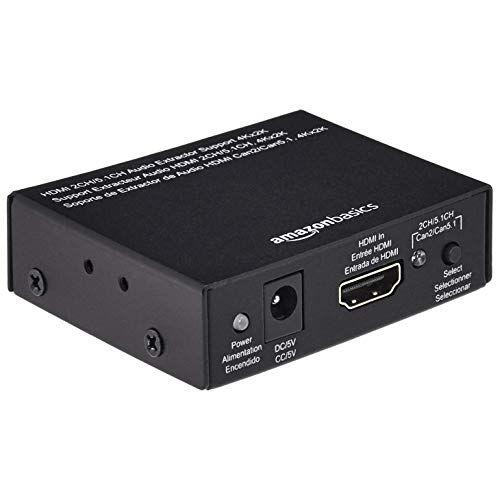
4. Amazon Basics 4K HDMI Audio Extractor
The Amazon Basics CEHFAE0101 is useful when a source lacks a separate audio output and your display needs no more than 8-bit 4K30. Its exact manual also lists 1080p60. The lower video ceiling is important for gaming or higher-refresh displays, even when the product name says 4K.
Pros
- Optical and coaxial digital outputs
- Compact format
- Stereo output
Cons
- 4K30 ceiling
- Separate USB power source may be needed
The manufacturer manual identifies three extracted audio connections: Toslink optical, coaxial digital and 3.5mm stereo. It does not show a stereo RCA pair. Digital outputs support compatible Dolby Digital 5.1 or DTS, while the stereo socket supplies two-channel audio. Select the source format accordingly.
| Model | Amazon Basics CEHFAE0101 |
| Video ceiling | 8-bit 4K30; 1080p60 |
| Audio outputs | Optical, coaxial and 3.5mm stereo |
| Digital surround | Compatible Dolby Digital 5.1 or DTS |
| Power | 5V via USB-to-DC cable |
Its supplied USB-to-DC power cable connects the DC plug to the extractor and the USB end to a suitable USB power source. The cable is not a charger for an internal battery. Allow for a compatible supply where needed, and use the channel selector described in the manual rather than expecting an automatic surround-to-stereo conversion.
5. OREI HDA-927
The OREI HDA-927 serves a different connection problem: it can route audio from an HDMI source or a TV’s ARC/eARC connection to an older HDMI-input receiver. It has a video HDMI output and a separate HDMI audio output, rather than the optical and analog sockets found on most choices here.
Pros
- HDMI-source or TV ARC/eARC audio
- Separate HDMI receiver output
- 4K60 passthrough
Cons
- No optical or analog output
- Not for an ARC-input soundbar
It supports video up to 4K60 and compatible HDR passthrough. The HDMI audio route can carry supported multichannel formats that an optical connection cannot. The receiving amplifier still has to decode that audio, and the TV must provide the relevant format through its ARC/eARC connection.
| Model | OREI HDA-927 |
| Video ceiling | 4K60, 18Gbps |
| Outputs | HDMI video and separate HDMI audio |
| Audio sources | HDMI source or TV ARC/eARC |
| Destination | Conventional HDMI-input receiver; not an ARC soundbar input |
The HDA-927 is not an adapter for connecting its HDMI audio output to an ARC/eARC-input soundbar such as a Sonos Arc. OREI’s support guidance makes that limitation explicit. Check the port direction and follow its ARC switch and EDID setup instructions before ordering; it is also not a 4K120 gaming passthrough.
6. Kinivo 360BNT
The Kinivo 360BNT combines a three-input HDMI switch with audio extraction. Its remote and front-panel selection let you choose one source for the connected display, while optical audio can feed a compatible receiver or soundbar. This preserves the multi-source convenience of the original switch recommendation.
Pros
- Three source inputs
- Remote selection
- TV ARC through optical
Cons
- No 4K120 passthrough
- Some standby sources prevent automatic switching
The maker specifies 4K60, 18Gbps and HDCP 2.2, with optical and 3.5mm audio outputs. HDMI passthrough audio support does not mean lossless surround fits through optical. For analog stereo, set a compatible source format; do not assume the unit decodes every bitstream merely because its HDMI path passes it.
| Model | Kinivo 360BNT |
| Video ceiling | 4K60, 18Gbps |
| Switching | Three HDMI inputs, one display output |
| Audio outputs | Optical and 3.5mm stereo |
| TV audio | ARC through Toslink; follow maker setup |
The 360BNT also supports TV ARC audio through Toslink with the appropriate TV connection and ARC enabled. Automatic switching may not behave as expected with sources that keep their HDMI signal active in standby, so the remote remains useful. The manual lists HDMI cables as separate; check the current package and needed audio cable.
7. Tendak HDMI Audio Extractor
The Tendak AV-096-BK is a basic extractor for compatible 1080p or 4K30 setups. It has one HDMI input, an HDMI output, optical audio and 3.5mm stereo. It is the older 4K30 version, not the similarly named Tendak HDMI 2.0 model with different capabilities.
Pros
- Optical and stereo connections
- Suitable for compatible older systems
- Current 4K30 variant
Cons
- No 4K60 passthrough
- USB power supply may be needed
Its analog output needs two-channel PCM. Optical can carry supported stereo PCM, Dolby Digital 5.1 or DTS to a decoder, but not lossless Dolby TrueHD or DTS-HD. Those formats appearing in the maker’s passthrough description concern the HDMI route. Set the source to a format your chosen extracted output and audio system accept.
| Model | Tendak AV-096-BK |
| Video ceiling | 4K30 version; not 4K60 |
| Audio outputs | Optical and 3.5mm stereo |
| Analog input format | PCM stereo |
| Power | USB cable; suitable external supply where required |
The USB cable supplies power rather than charging a battery, and the maker calls for an external USB supply where the source connection cannot provide sufficient power. This version is not a 4K60 device. Choose a higher-bandwidth model if your display or console needs more than its documented video limit.
What are HDMI Audio Extractors?
An HDMI audio extractor separates sound from an HDMI source and outputs it through particular audio connections. Analog stereo, optical/coaxial digital and a separate HDMI audio output serve different destinations. Check the exact ports and formats: most compact analog-output models do not supply discrete multichannel analog connections.
Do you need an HDMI Audio Extractor?
It can help connect a streaming box, disc player or other HDMI source to an older stereo amplifier, DAC or receiver. Start by checking the connections you already have. If the TV or source provides a compatible audio output directly, adding another box may be unnecessary.
What is the difference between an HDMI Audio Extractor and Audio Splitter?
An HDMI splitter duplicates an HDMI source for multiple destinations. An audio extractor exposes audio through separate outputs; a combined switch/extractor also chooses among sources. ARC/eARC describes audio returning from a TV, which a conventional source-to-display extractor does not automatically support.
Does an HDMI Audio Extractor affect the quality of the audio or video?
An extractor should pass a supported video signal without an unwanted change, but bandwidth, HDCP, HDR and handshake limits can restrict your setup. Its analog conversion and the receiving audio system also matter. Bypassing the TV’s audio route may change delay, but there is no universal guarantee of better fidelity or perfect lip sync.
What kind of Extractor do you need? With audio output only or with video output?
First identify whether you need audio from an external HDMI source or from the TV’s apps. For an external source, video passthrough is often necessary because the extractor sits between source and display. For TV audio, choose a suitable ARC/eARC-input device and confirm whether the destination expects optical, analog or conventional HDMI audio.
Conclusion
Before choosing, write down your required video resolution and refresh rate, HDR format, audio destination and source format. Optical commonly means stereo PCM or compatible compressed surround, while analog outputs may require PCM or documented decoding. None of these seven models should be assumed to pass 4K120, VRR or 8K simply because a console or newer TV supports them.
My general 4K60 pick is the J-Tech Digital 4K 60HZ HDMI Audio Extractor for a compatible HDMI source feeding optical or PCM stereo audio. Choose the HDA-913 if you specifically need its supported stereo downmixing, or the HDA-927 for its separate older-receiver HDMI route.
My straightforward alternative is the OREI HDA-912. Compare its current package price and connections with your system; correct format compatibility matters more than a claim of unbeatable value.