
If you want to record with good sound quality then you need an audio interface. Many musicians and producers are frequent travelers so this article will take you through some of the best portable audio interfaces that you can easily travel around with.
Some of the most important considerations to keep in mind when buying an audio interface are the number of inputs, number of outputs, and phantom power.
My top recommendation for the best portable audio interface is the Focusrite Scarlett Solo 4th Gen. By far the most frequently used and well-rounded choice for many.
My second recommendation for the best portable audio interface is the Behringer U-PHORIA UM2. This is a budget option if you want a solid audio interface without breaking the bank.
The 7 Best Portable Audio Interfaces (2026)


Let’s compare these in more detail.
1. Focusrite Scarlett Solo 4th Gen
Scarlett Solo 4th Gen suits a singer or guitarist recording one microphone and one instrument at a time. The separate input types and independent headphone control make it easy to keep a small recording setup tidy. Its Air modes give you an optional preamp character change, while direct monitoring helps you hear yourself without a distracting software delay.
It has one microphone preamp, not two. Choose the UMC202HD, MOTU M2 or MiniFuse 2 if you need two microphones simultaneously.
Pros
- Top Pick – One mic input and one instrument input for solo recording.
- 4th
Cons
- It has one microphone preamp, not two. Choose the UMC202HD, MOTU M2 or MiniFuse 2 if you need two microphones simultaneously.
| Generation | 4th |
| Inputs | One mic; one instrument |
| Connection | USB-C |

2. Behringer U-PHORIA UMC202HD
UMC202HD is a better fit for a two-input portable setup than the older UM2 recommendation. It has two combination inputs, Midas-designed microphone preamps, phantom power and direct monitoring. The 24-bit/192 kHz conversion capability is useful, but input count and driver compatibility matter more than choosing the highest sample rate.
Check the current driver and operating-system requirements before using it with your laptop. It does not provide the MIDI connections offered by some of the other interfaces here.
Pros
- Budget Pick – Two mic/line/instrument inputs with USB power.
- Two combination inputs
Cons
- Check the current driver and operating-system requirements before using it with your laptop. It does not provide the MIDI connections offered by some of the other interfaces here.
| Inputs | Two combination inputs |
| Outputs | Two line outputs; headphones |
| Maximum conversion | 24-bit / 192 kHz |

3. MOTU M2
MOTU M2 is the higher-feature portable pick for musicians who want two mic/line/instrument inputs, MIDI connections and a clear view of recording levels. Its front-panel meters are useful when setting gain away from a full studio desk. USB bus power avoids the external power supply and older Thunderbolt dependency of the previous Apollo Twin MkII choice.
It does not run UAD DSP plug-ins like an Apollo. Choose it for practical portable recording and metering rather than expecting that processing system.
Pros
- A USB-powered two-input interface with clear level meters.
- Two mic/line/instrument
Cons
- It does not run UAD DSP plug-ins like an Apollo. Choose it for practical portable recording and metering rather than expecting that processing system.
| Inputs | Two mic/line/instrument |
| Connection | USB-C, bus-powered |
| MIDI | In/out |

4. Rode AI-1
Rode AI-1 is the compact choice if you only need to record one source at a time. Its single combination input accepts a microphone or instrument, and the interface provides phantom power, balanced monitor outputs and headphone monitoring. The limited control layout is convenient for a small voiceover or guitar setup.
One input means you cannot record a separate vocal microphone and guitar input simultaneously. It also has no MIDI ports.
Pros
- One combination input for a simple voice or instrument setup.
- One combination input
Cons
- One input means you cannot record a separate vocal microphone and guitar input simultaneously. It also has no MIDI ports.
| Inputs | One combination input |
| Outputs | Balanced stereo; headphones |
| Connection | USB-C |
5. PreSonus AudioBox USB 96 25th Anniversary Black
This PreSonus pick is the black 25th Anniversary AudioBox USB 96, not the old blue listing. Its two microphone/instrument inputs, MIDI connections and monitor mix knob suit a basic mobile recording setup. USB bus power and a sturdy chassis make it practical to carry with a laptop.
Its analog inputs are specified for microphones and instruments; do not treat it as a general line-input interface for every synth output. Software bundles can change, so choose it for the hardware you need.
Pros
- A compact two-input interface with MIDI and a monitor mix control.
- 25th Anniversary, black
Cons
- Its analog inputs are specified for microphones and instruments; do not treat it as a general line-input interface for every synth output. Software bundles can change, so choose it for the hardware you need.
| Edition | 25th Anniversary, black |
| Inputs | Two mic/instrument |
| Maximum conversion | 24-bit / 96 kHz |
| MIDI | In/out |

6. Audient iD4 MKII
Audient iD4 MKII suits a musician who wants one microphone input and a separate JFET instrument input in a small metal interface. Two headphone sockets are useful when someone else needs to listen, and the monitor mix control gives direct monitoring. It records at up to 24-bit/96 kHz and uses USB bus power.
The two headphone sockets do not create two independent monitor mixes. It has one microphone preamp, and the USB port must supply sufficient power.
Pros
- A compact mic-and-instrument setup with two headphone sockets.
- One mic/line; one JFET instrument
Cons
- The two headphone sockets do not create two independent monitor mixes. It has one microphone preamp, and the USB port must supply sufficient power.
| Inputs | One mic/line; one JFET instrument |
| Maximum conversion | 24-bit / 96 kHz |
| Power | USB bus power |
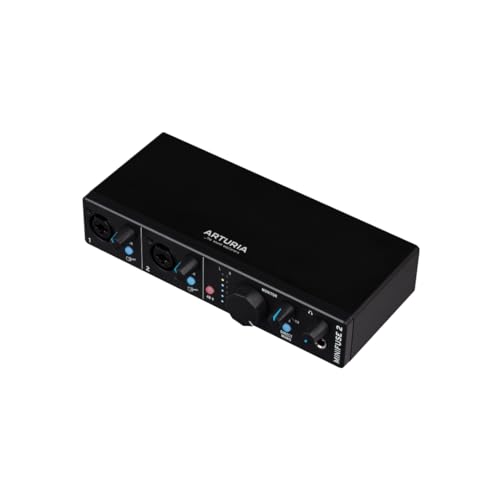
7. Arturia MiniFuse 2 Black
Arturia MiniFuse 2 is a useful all-rounder for a portable setup with two microphones or line sources. It offers two combination inputs, two line outputs, headphone monitoring and MIDI in/out. Its USB hub port can help keep a small compatible peripheral connected when your laptop has few ports.
The hub has a limited power budget, so it cannot power every USB device. Check the current software bundle and host compatibility separately from the hardware connections.
Pros
- Two combination inputs, MIDI and a compact USB-powered layout.
- MiniFuse 2, black
Cons
- The hub has a limited power budget, so it cannot power every USB device. Check the current software bundle and host compatibility separately from the hardware connections.
| Model | MiniFuse 2, black |
| Inputs | Two combination inputs |
| MIDI | In/out |
| Power | USB bus power |
Should you get a Mixer or Audio Interface?
When you think of a recording studio you usually think of a huge mixer and an engineer masterfully moving the sliders on it. But in reality, you don’t necessarily need a large hardware mixer.
Software development has made sound mixing digital. Sure some people still like doing it the old way with an analog mixer, but as a minimum, all you need is a simple audio interface to connect and transform your analog signal into digital for your computer to read. After that, you’ll just have to mix everything in your DAW (digital audio workstation software, such as Logic, Pro Tools, Ableton Live, etc).
Also, you should know that some of the mixers on the market today act as audio interfaces as well, so if you’re looking for it, you can get a 2-in-1 option as well.
What does an audio interface do?
An audio interface is, to put it simply, converting your sound from analog into digital so that your computer can read it. It’s necessary if you want to record your sound through your computer with decent sound quality.
How many inputs/outputs do I need?
The number of inputs depends on how many things you want to record at once. If you’re a singer/songwriter, you’ll probably need just two (one for your mic and one for the instrument). If you want to record more, you’re going to need more inputs (as for more instruments or mics at once).
As for the outputs, you should look out to have at least one stereo output, as well as a headphone/monitor out, to ease up your recording sessions.
Does the interface affect sound quality?
The interface’s preamps, converters and monitoring affect how you record and hear a signal. Correct gain settings, a suitable microphone and good recording technique remain important alongside the hardware.
Do I need phantom power?
If you have equipment that does need phantom power, then your audio interface will need phantom power. The most common items that people have that need phantom power are condenser microphones. Check your equipment before buying an audio interface to make sure it suits your needs.
Can I use a USB mic instead?
A good USB microphone can be suitable for a simple one-mic setup. A separate interface gives you more choice of microphones, instruments, input counts and monitoring arrangements, which matters when the setup grows.
Summary
If you want to record multiple instruments at the same time, then you need to make sure that you have enough inputs. Also, be sure that you have enough outputs for your needs (e.g. mixing desk, routing to other gear, in-ear monitors, etc).
Also, you may require phantom power depending on what gear you’re using, such as condenser microphones, be sure to check the specs of the interface before buying.
My top portable audio interface pick is the Focusrite Scarlett Solo 4th Gen. This is the a practical choice for recording one microphone and one instrument in a small USB-powered setup.
My budget portable audio interface pick is the Behringer U-PHORIA UM2. If you want to spare your pockets but still have a decent audio interface then this is the one.