
A sound card (or audio interface) is a key part of music production. It allows music processing on modern computers in homes and studios worldwide.
Default sound cards in most computers and laptops can’t match a full-fledged sound card or audio interface. Fortunately, there are excellent choices available in technology, hardware, usability, and affordability.
My top pick is the Focusrite Scarlett 2i2 4th Generation. It’s a widely popular audio interface with a fantastic software bundle.
My budget pick is the PreSonus AudioBox USB 96 25th Anniversary. It’s a great, affordable option for beginners seeking a sound card/audio interface.
The 7 Best Sound Cards for Music Production (2026)






Let’s compare these in more detail.
1. Focusrite Scarlett 2i2 4th Generation
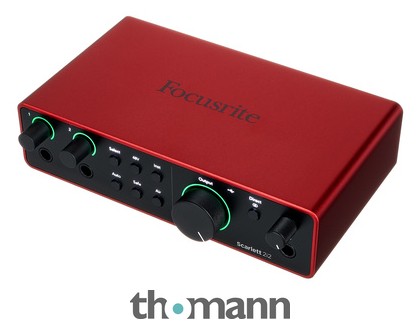
Focusrite has made a significant impact with the Scarlett range. The fourth-generation Scarlett 2i2 remains a useful two-input interface for recording a vocal and guitar together, or a stereo instrument. Focusrite Control 2 manages its settings; check the current registration bundle rather than assuming an older software subscription is still included.
The 2i2's fourth-generation model features two microphone preamps, 48-volt phantom power and Air modes for presence or harmonic drive. Auto Gain helps establish input gain, while Clip Safe can reduce gain when the input approaches clipping. Neither replaces sensible microphone placement or a check of the loudest passage before recording.
This is my top pick for a straightforward home studio because those controls address practical recording tasks without a larger mixer-style panel. Its front instrument/line jacks and rear XLR sockets share two recording channels: four physical sockets do not mean you can record four separate analog sources simultaneously.
There are two balanced monitor outputs and a headphone output, with direct monitoring and software loopback available. The USB-C socket uses the USB 2.0 protocol. Choose a larger interface if you need MIDI sockets, more physical inputs or ADAT expansion; the 2i2 does not provide them.
2. PreSonus AudioBox USB 96 25th Anniversary
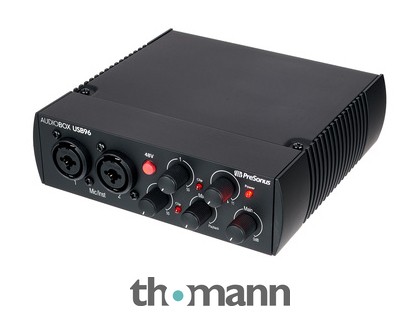
The PreSonus AudioBox USB 96 is an affordable USB 2.0 audio interface for a compact home studio. This convenient two-channel sound card records at up to 24-bit/96 kHz digital resolution. The black 25th Anniversary version is the exact model listed here, rather than a microphone-and-headphone studio pack.
It features dual preamps with combo inputs, allowing you to record both a microphone and an instrument. It also offers onboard +48V phantom power for condenser microphones. MIDI input and output are useful if you have older keyboards or sound modules without USB MIDI.
A physical Mix control blends the direct inputs with computer playback, so you can hear your performance without routing it through a delayed software-monitoring path. The input jacks are intended for microphones and instruments. Check the manual before connecting a strong line-level synth output, and avoid assuming every combo jack accepts every signal level.
The current manufacturer page lists a six-month Fender Studio Pro trial. Confirm the entitlement for your exact package before registering it, especially if the bundled DAW will be your main recording software. The interface itself works with suitable Mac and Windows recording software independently of that promotional bundle.

3. Universal Audio Apollo Twin X DUO Gen 2 with UAD Analog Classics
Universal Audio's Apollo Twin X DUO Gen 2 is a compact Thunderbolt 3 interface with two Unison microphone preamps and two onboard DSP cores. It takes the place of the first-generation Twin X DUO in this list. The selected package includes UAD Analog Classics; larger software bundles are separate offers.
Its 10-in/6-out specification includes digital input channels, rather than ten microphone sockets. There are two mic/line combo inputs, a front Hi-Z instrument input, optical ADAT or S/PDIF input, monitor and line outputs, and a stereo headphone output. Connected sources still need to be routed within the available channels.
The large front dial and accompanying buttons control input gain, monitoring and preamp settings. Current UAD Console provides functions including Auto-Gain and plug-in scenes. The important benefit is recording through supported UAD effects on its DSP; the number of plug-ins you can run depends on their processing demands.
The embedded video demonstrates an older Twin X. It is useful background for the desktop layout, but it does not demonstrate the Gen2 converters or current bundle. Check Universal Audio's current computer requirements before ordering: a USB-C-shaped port alone does not establish Thunderbolt support, and the Thunderbolt cable is a separate purchase.
Consider the QUAD version if your intended DSP chains exceed DUO capacity. A producer using mainly native DAW plug-ins may get more value from a simpler USB interface. Monitor Correction and optional software upgrades also need their own compatibility and licensing checks.

4. Yamaha URX22C
The Yamaha URX22C is a compact two-input interface with DSP-assisted monitoring. Yamaha and Steinberg moved the UR22C family to Yamaha branding as URX22C; this is not merely a new name for the original mkII. It retains the practical two-input, metal-housing format while adding the UR-C family's DSP-assisted monitoring.
Two D-PRE mic/line combo inputs handle recording sources, with a Hi-Z option on input 2 for guitar or bass. There are balanced monitor outputs, a headphone output and MIDI input/output. A singer and guitarist can record together, while a hardware keyboard's MIDI data can control software instruments without consuming an audio channel.
Its DSP mixer can provide REV-X reverb, a channel strip and Guitar Amp Classics during monitoring. These are useful for making a headphone mix comfortable while keeping the recording workflow under control. Check routing in dspMixFx rather than assuming the monitor effect is always printed into the recorded track.
The USB-C connection supports USB 3.0 and the unit offers 32-bit integer/192 kHz operation. That format is not 32-bit float recording and cannot rescue a clipped analog input. Confirm available USB power and the prescribed supply arrangement for an iPad or lower-powered connection.
The video shows the older UR22mkII, so use it only as background for that earlier model. For this Yamaha unit, follow the current URX22C manual and driver requirements. Cubase AI and the listed download software require registration; check the actual current licence package before buying.
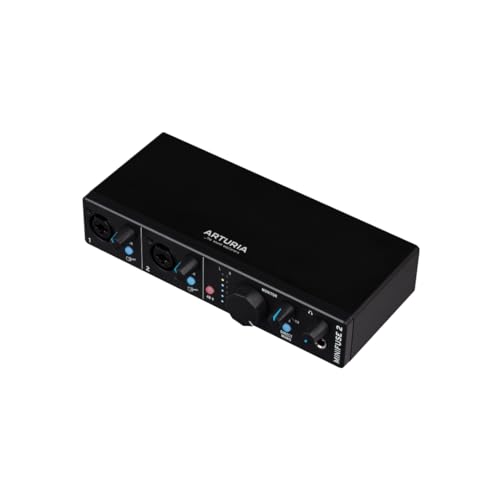
5. Arturia MiniFuse 2 Black
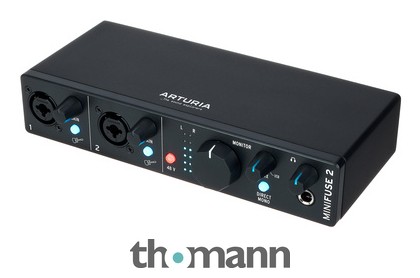
The Arturia MiniFuse 2 Black is a portable two-input USB audio and MIDI interface. Its MIDI connections let you connect a hardware keyboard or sound module alongside microphone and instrument recording. This is the original MiniFuse 2, not the white MiniFuse 2 OTG or a microphone recording pack.
Two front combo inputs accept microphones, line sources or instruments, with gain controls and phantom power. Balanced rear outputs connect to studio monitors, and a headphone output has its own level control. The direct-monitor Mix control lets you balance the inputs against computer playback during recording.
MIDI input and output make it useful with hardware synths, while the USB-A hub can accommodate a compatible low-power USB device. Check the manual's hub power limit rather than treating it as a powered multi-device dock. The interface itself is bus-powered through its computer connection.
Loopback can capture computer playback for a tutorial or stream alongside your live inputs. Set the recording application's channels deliberately, and avoid feeding its own monitored output back into the captured loop. The included software requires registration; promotional subscriptions are different from permanent licences.
The limitation is the familiar two-input ceiling: a stereo keyboard consumes both analog channels, leaving none for a separate vocal microphone. There is no ADAT expansion. The newer OTG model adds a different dual-device workflow, so choose that separately if a phone and computer need simultaneous connections.
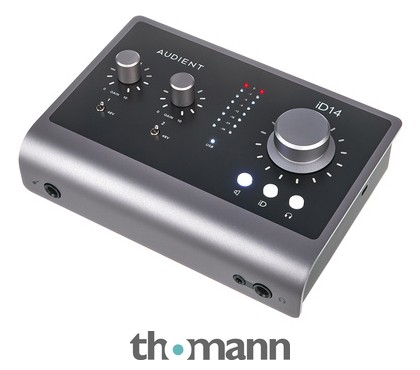
6. Audient iD14 MKII
The Audient iD14 MKII offers a 10-in/6-out USB-C interface format with two microphone preamps and a JFET instrument input. Its optical input is the route to additional recording channels. Those advertised ten inputs are not ten onboard mic preamps: expanding with ADAT requires a separate compatible converter or preamp.
There are two combo mic/line inputs and four balanced line outputs, useful for monitoring or an additional stereo route. The headphone connection is available on two jack sizes. Do not assume the two sockets provide two independent artist mixes simply because both can accept headphones.
It is bus-powered, including phantom power, when the USB connection meets Audient's requirements. Check the computer port or hub against the current manual. Using a USB-C connector does not by itself guarantee sufficient power, and available power also affects headphone output performance.
The metal chassis and compact controls make it a practical studio box. ScrollControl lets the large encoder adjust compatible onscreen parameters, and software manages monitoring and routing. The ARC offers are a separate software-benefit programme; they are not what makes the interface's Mac and Windows drivers work.
This is a sensible choice if you expect to add more inputs later without immediately buying a larger desktop unit. The optical channel count depends on the digital format and sample rate. Budget for that expansion hardware and check its clocking setup before treating the maximum channel count as available from the box alone.
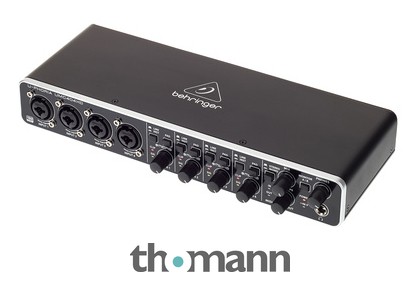
7. Behringer U-PHORIA UMC404HD
The UMC404HD offers a four-input/four-output setup with four Midas-designed microphone preamps. That makes it an affordable choice when you need more analog recording sources than the two-input units above. For example, a vocal mic, a guitar mic and a stereo keyboard can use all four channels in one session.
The panel provides Line/Instrument switches, gain controls and pads for the input channels. The combination XLR/TRS sockets accept the appropriate microphone, instrument or line-level connections. Set the input mode to the source instead of compensating for a mismatched signal by turning gain down alone.
A monitor-mix control and stereo/mono monitoring options help with headphone monitoring, while MIDI input/output and analog insert connections broaden its use with external gear. Playback routing is more flexible than a basic two-output interface, but you still need to configure the DAW's output channels correctly.
The UMC404HD provides four analog input channels, making it suitable for several sources in one session. Use the current manufacturer downloads and supported operating-system guidance; do not assume a past promotional recording package is still included. Check the prescribed power arrangement before a location session.
The main reason to choose it is its four analog inputs. It has no ADAT route for adding another bank of microphone preamps, and a four-channel interface cannot record a larger individually miked drum kit by itself. If expansion is likely, compare that future requirement with the Audient's optical-input approach.
How important is a good sound card for music production?
A suitable audio interface provides the microphone, instrument and line connections needed for recording external sources. Driver support and monitoring facilities can make a session more practical. A professional result also depends on the performance, microphones, room, recording levels and mix, not the interface alone.
For electronic music made entirely with software instruments, built-in audio can be sufficient to start. If you regularly record vocals, guitars or hardware keyboards, choose an interface with the appropriate inputs and dependable support for your computer. The right channel count and monitoring arrangement help you work efficiently.
Does a soundcard matter for recording?
An external audio interface is useful when you need microphone or instrument inputs, dependable monitoring, or lower-latency drivers. You can still compose and mix software instruments using a computer’s built-in audio. Recording external sources is where the available input types, gain controls and driver support become especially important.
Does a soundcard improve the audio quality of recordings?
An interface’s preamps, converters and drivers affect recording and monitoring, but it cannot repair a poor performance, noisy room or unsuitable microphone placement. Input count sets the number of separate sources you can capture. Better outputs may improve a particular monitoring setup, although an external interface does not automatically improve every speaker, headphone or audio file.
What are the key features to consider while buying a soundcard?
Recording enthusiasts should consider sound quality, preamp, price, Digital I/O, and connection format before picking a sound card. Identify your needs and budget first to narrow down choices, then compare other features.
Summary
Whether you’re a curious novice or a seasoned recording artist, today’s market offers a plethora of choices. I hope this article has helped you find the right sound card for your needs and budget.
My top pick is the Focusrite Scarlett 2i2 4th Generation, a highly popular audio interface that includes a great software bundle.
My budget pick is the PreSonus AudioBox USB 96 25th Anniversary, an affordable and beginner-friendly choice for a good sound card/audio interface.