
My top pick is the Shure SM58. This popular dynamic mic comes from a powerhouse microphone company.
My budget pick is the Samson Q2U Recording Pack. This handheld dynamic microphone offers USB and XLR connections; confirm the cable, adapter and Smule input route for your phone.
The 6 Best Microphones for Smule


Let’s compare these in more detail.

1. Shure SM58
2. Samson Q2U Recording Pack
The Samson Q2U is a handheld dynamic microphone with both USB and XLR outputs. It gives you a budget option for recording vocals and a headphone socket for direct monitoring. For Smule, a compatible physical connection is only the first step: your phone and the app must also select the external microphone. Check that route before buying an adapter or microphone.
The recording pack includes a small desktop stand, clip, windscreen and connection cables. Q2U hardware revisions use different USB connectors, and the exact pack reviewed here should not be assumed to include the cable needed by every USB-C or Lightning phone. Samson documents Apple camera-adapter connections for supported iOS devices. Its Android support material does not establish that an external USB microphone works in Smule on every Android handset.
The Q2U is worth considering for a karaoke setup that can also handle other recording tasks. Keep your budget for the correct cable or powered adapter, if needed. Its XLR output also lets you use a compatible audio interface later; that flexibility is more useful than a blanket promise of instant phone compatibility.
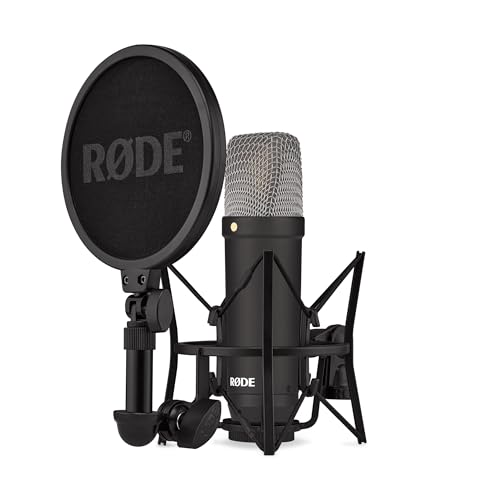
3. Rode NT1 Signature Series Black
This large-diaphragm condenser is a useful choice for vocals in a quiet recording space. Signature is the XLR version, rather than the NT1 fifth-generation model with USB. Its low self-noise is useful for clean recordings, but room reflections, background noise and distance still affect the result. Do not rely on capsule size or the supplied accessories to fix a noisy room.
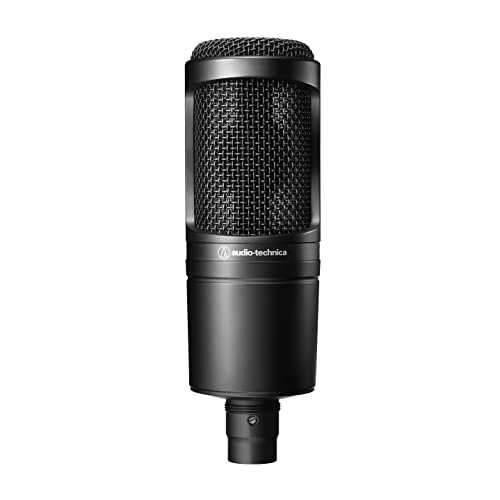
4. Audio-Technica AT2020
You might have seen the Audio Technica AT2020 in studios or home setups. This popular condenser microphone offers great quality sound at an attractive price. Its appealing specs and modest price tag make it a strong choice.
The AT2020 has a cardioid pickup pattern and a 20Hz–20 kHz frequency range. Audio-Technica specifies a 144dB maximum SPL at 1% distortion, although that is not a target recording level. Use a stand and address the front of the microphone from the side. The standard AT2020 has an XLR output; it is not the USB model.
You’ll need 48V phantom power from a suitable microphone input, plus an audio interface that your phone and Smule support. The supplied stand mount is not a shockmount, and a pop filter can be a useful extra. Confirm routing and headphone monitoring before assuming the setup is ready for a karaoke session.

5. Sennheiser e835
The e835 has a 40Hz–16kHz frequency response and a cardioid pickup pattern. Its dynamic capsule does not require phantom power, but its XLR output still needs a suitable interface to reach a phone. It is a practical option if you also want a microphone for a mixer or live vocal setup.
The capsule’s shock mounting helps reduce handling noise. Cardioid pickup reduces some sound arriving from behind the microphone, but does not remove all room noise or make position irrelevant. Keep a consistent singing distance and check levels before recording. The e835 can be a dependable alternative to the SM58 when you prefer its vocal response.
6. Shure MV6 Gen 2 Black
The Shure MV6 Gen2 is a USB-C dynamic microphone with a 3.5mm headphone output for direct monitoring. Shure introduced this generation in September 2026 and confirms support for PC, Mac, Android and Apple mobile devices. That hardware support does not certify every Smule setup, so check the app recognises the external input on your device.
This generation includes a Singing preset, adjustable auto-level processing, an adjustable denoiser and a 5-band EQ in supported MOTIV apps. Settings available in those apps are not automatically Smule controls. For music, avoid excessive noise reduction that cuts quiet phrases or changes the sound, and compare a short recording before settling on processing.
The included desktop stand and USB-C cable make a compact setup, while the headphone output helps you hear the microphone without a software-monitoring delay. This is the black MV6G2-K variant, not the original MV6. If your phone uses Lightning, verify the required approved adapter and power arrangement; do not assume the included USB-C cable plugs directly into it.
What is Smule?
Smule is a popular karaoke app available for both iOS and Android. You can sing with friends, record yourself, and share videos for the community to rate and enjoy.
Choose from thousands of songs from various eras and regions, adjust your voice with filters, and apply effects to get the sound you want.
The importance of using a pop-filter
People often use pop filters, those circular meshes in front of microphones you have probably seen. They help reduce air bursts, but placement also matters. Keep the filter between your mouth and the microphone, leave some space and listen for pops before recording the whole song.
Also, check out my article on microphone stands if you need one.
Use this setup with other apps
After setting up your recording equipment, you can use it for more than Smule. XLR microphones can work with suitable mixers or recording interfaces, and USB microphones can work with compatible recording apps. Compatibility still depends on the device, connection and software. Test input selection, playback and monitoring in each app rather than assuming a setup transfers unchanged.
Conclusion
I hope this article helped you find the best microphone for Smule. While many use these mics for karaoke, you’re not limited to the Smule app. Feel free to use the microphone in different settings, experiment, and enjoy!
My top recommended karaoke mic is the Shure SM58, an extremely popular dynamic mic from a well-known manufacturer.
For a budget setup, consider the Samson Q2U Recording Pack. Confirm your phone connection and Smule input first, then choose based on the recording and monitoring features you will actually use.