
A good microphone lets you be heard clearly on Discord, enhancing communication. Your gaming friends will hear you better, and you’ll make a bigger impact when speaking.
There are plenty of great-sounding microphones for the home market. Here’s my roundup of the 7 you should consider.
My top pick is the Blue Yeti USB microphone. It delivers professional sound quality and allows you to change polar pickup patterns.
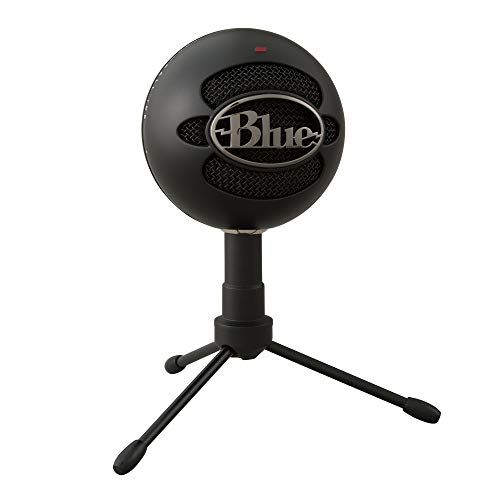
My second recommended microphone is the Blue Snowball iCE. Despite its low price, this Discord-certified mic delivers clear sound and looks stylish.
The 7 Best Microphones for Discord (2026)


Let’s compare these in more detail.
1. Blue Yeti USB
The Blue Yeti USB microphone offers broadcast-quality vocal reproduction, making it an excellent choice if you want to sound your best on Discord. Voices have great clarity and presence, delivering a professional-level feel that lesser microphones can’t match.
Pros
- Broadcast quality recordings
- Four pickup patterns
- An easily positioned design
Cons
- Picks up background noise
- No on/off switch
Pair this microphone with Blue Voice software to add enhanced effects and advanced modulation to entertain your friends. You can also incorporate HD audio samples to add a new dimension to your recordings.
The microphone’s pickup pattern can be adjusted based on your recording needs. You can select from four options: Cardioid, Omni, bidirectional, and stereo. This flexibility ensures you get the best sound in various situations.
| Connectivity | USB |
| Polar Pattern | Cardioid, Omni, bidirectional, stereo |
| Audio Sensitivity | 120 dB |
| Bonus features | Selectable polar patterns, flexible position |
The Blue Yeti USB mic offers plug-and-play ease. You can connect it straight to a mic stand or boom arm. The adjustable desktop stand lets you angle the mic for various recording needs. Onboard controls include a mic gain knob, headphone volume, and instant mute.
2. Blue Snowball iCE
The Blue Snowball iCE proves you can get excellent microphones for Discord without spending a lot. It features Blue’s custom condenser capsule, providing clarity far better than most computer microphones.
Pros
- Crystal clear audio
- Plug-and-play convenience
- Stylish, with an adjustable stand
Cons
- Only one polar pattern
- Picks up background noise
- The construction is not top-quality
The Blue Snowball iCE is Discord-certified, making it perfect for that purpose. It’s plug-and-play, so setting it up is extremely easy.
The iCE is well built, featuring a stylish retro design that looks great on camera. The adjustable desktop stand helps find the best position for top broadcast quality in any setting. Its space-saving design works well in tight spaces. The Ice comes in two colors, so you can choose one that fits your decor.
| Connectivity | USB |
| Polar Pattern | Cardioid |
| Audio Sensitivity | NA |
| Bonus features | Adjustable stand |
This microphone features a single cardioid pickup pattern, which suits most situations. If you’ll frequently use it in group settings, the lack of options might be a drawback. For most Discord users, though, this mic could be all you need.

3. HyperX QuadCast
The HyperX QuadCast isn’t for the shy. If you like a bold look, this mic with its striking red lighting, could be just right for you.
Pros
- Excellent quality with a distinctive look
- Selectable polar pattern and gain control
- Anti-vibration shock mount and pop filter
Cons
- Plastic shock mount
- Not the best resolution for capturing quality
The QuadCast, backed by Discord certification, offers more than distinctive looks. For the price, the sound quality is top-notch. Muting the mic is simple—just tap it. The light turns off when muted, letting you know instantly when you’re live.
The built-in anti-vibration shock mount of this microphone uses elastic rope suspension to fully isolate the mic and prevent unintentional rumbles from spoiling the feed. It also has a versatile adapter making it compatible with a variety of boom arms and mic stands. The integral pop filter suppresses plosive sounds, keeping your voice clear and undistorted at all times.
| Connectivity | USB |
| Polar Pattern | Cardioid, Omni, bidirectional, stereo |
| Audio Sensitivity | 120 dB |
| Bonus features | Selectable pickup pattern |
The Quadcast has a gain control to adjust mic sensitivity. You can choose from four polar patterns for the best sound pickup. The headphone jack lets you monitor the mic feed, making it easy to adjust for optimal sound.

4. Rode NT-USB
Considering the Rode NT-USB is based on their studio mics, it’s clear why many content creators and gamers prefer it. The NT-USB delivers professional-quality recordings with a rich, full sound. The removable external pop filter helps eliminate plosive sounds, or you can remove it if you prefer to use software for sound suppression.
Pros
- Studio quality sound
- Gain, mix controls, and pop filter
- Many accessories
Cons
- Plastic boom bracket
- One polar pattern
The NT-USB features a striking design, making it a great addition to any video. This microphone has a zero-latency stereo monitoring jack, letting you hear the mic input in real time, ensuring optimal sound.
This mic lets you adjust the gain level, which is useful if you’re picking up hisses. You can also tweak the mix between computer audio and the mic input to control sound quality.
| Connectivity | USB |
| Polar Pattern | Cardioid |
| Audio Sensitivity | 110 dB |
| Bonus features | Gain and mix controls |
The NT-USB includes an adjustable mic clip and desktop stand, making it easy to mount on a stand or set at the right height on a table. Setup’s simple—just plug it in. A pouch is also included for storage when not in use.
5. Audio-Technica ATR2500x
The Audio-Technica ATR2500x is a large diaphragm, side-address condenser microphone for precise recordings. Its low-mass diaphragm provides a great frequency response. With a high-quality A/D converter supporting up to 24-bit/192 kHz sampling, you get outstanding digital audio quality.
Pros
- Accurate sound, good frequency response
- 24-bit/192 kHz A/D converter
- Durable, low-noise, metal construction
Cons
- Low-quality stand
- Only one polar pattern
The Audio-Technica’s durable metal construction reduces self-noise, eliminating annoying static in digital recordings. Its rugged build makes it easy to transport. The package includes a tripod desk stand with folding legs for portability.
Plug-and-play convenience makes this microphone easy to use. It’s fully compatible with Windows and Mac. Just plug it into your USB socket to get started. Two cables with USB-C and USB-A ends are included for hassle-free connectivity.
| Connectivity | USB |
| Polar Pattern | Cardioid |
| Audio Sensitivity | 140 dB |
| Bonus features | Headphone jack with volume control |
The ATR2500x has a threaded stand mount that pivots for the ideal position and attaches securely to its stand or microphone arm. It also includes a headphone jack for monitoring the mic feed and buttons on the front to control headphone volume.

6. Shure MV5
Professionals in the audio industry extensively use Shure microphones for their great quality. The Shure MV5, a digital condenser mic, features a custom-tuned capsule that delivers pristine studio-quality sound.
Pros
- Studio quality sound
- Auto gain and EQ, preset DSP modes
- Retro, stylish appearance
Cons
- Controls are hard to reach
- Plastic design
- Audio-sensitive mic
This advanced microphone automatically applies gain, EQ, limiting, and compression to deliver the best sound. You can also choose from three DSP modes: vocal, flat, and instrument for optimal quality in different scenarios.
The Shure MV5 features a stylish retro design in two colors to match any interior. Its anodized aluminum desktop stand enhances its look. The mic’s integrated thread lets you mount it on a standard camera tripod. Optimized for portable use, the MV5 is perfect for taking with you anywhere.
| Connectivity | USB |
| Polar Pattern | Cardioid |
| Audio Sensitivity | 130 dB |
| Bonus features | DSP presets, auto EQ |
The MV5, Apple MFi-certified, connects directly to any iOS device using the included Lightning cable, no adapters needed. It also comes with a USB cable for easy PC connections. This microphone has a built-in headphone jack for sound monitoring.
7. Razer Seiren X
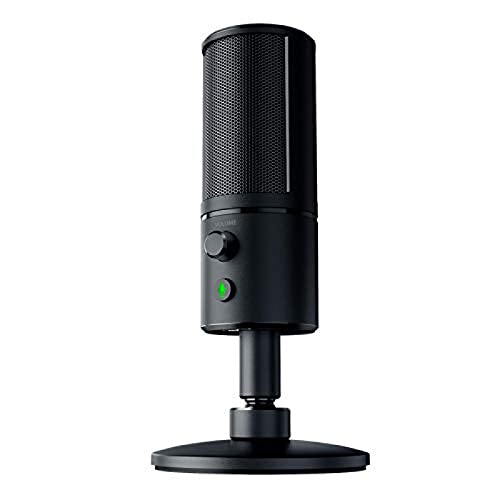
Streamers love the Razer Seiren X for its excellent performance and value. It features a condenser capsule with a wide frequency range and top-notch transient response. The built-in shock mount reduces noise, and a zero-latency headphone jack lets you monitor sound in real-time without echo distractions.
Pros
- Clear sound with shock mount suppression
- Supercardioid polar pattern limits noise
- Compact and portable
Cons
- Suitable only for one user
- Not the best low and mid-range frequencies
The Razer, made from anodized aluminum, boasts a sleek, slim profile that remains unobtrusive. Compact and portable, it fits even on tight desks and is easy to carry. The stand offers sturdy support without drawing attention. Its modular design allows for easy disassembly and transport.
The Seiren X features a super-cardioid polar pattern, which is more focused than the cardioid pickup. This significantly reduces background noise, ensuring the speaker is heard clearly.
| Connectivity | USB |
| Polar Pattern | Cardioid |
| Audio Sensitivity | 110 dB |
| Bonus features | Built-in shock mount |
A zero-latency headphone jack lets you monitor sound in real time without echo distractions. There’s also a mute button, and the front volume control helps you quickly find the best level.
Do you need a good microphone for Discord?
The microphones on most laptops often produce poor sound quality. As a result, your audience may struggle to hear you clearly on Discord. Investing in a good microphone is a smart choice. It ensures your voice is clearer and helps you communicate effectively during gameplay.
Are USB microphones better than XLR microphones?
Both USB microphones and XLR microphones provide similar sound quality since they often use the same components. The key difference is that USB mics connect directly to your computer’s USB port, while an XLR mic needs an audio interface or mixer before the signal reaches your computer. Although this offers more control, a USB mic is usually more convenient and sufficient for most purposes.
What is the best Polar Pattern on a microphone for Discord?
Microphones generally have four polar patterns: cardioid, omnidirectional, bi-directional, and stereo. The cardioid pattern is ideal if you’re the sole recorder since it picks up sound from the front, making it excellent for Discord.
Omni mode captures sound from every direction around the mic. Bidirectional mode picks up sounds from both the front and back. Stereo mode is perfect for group settings like podcasts or music recordings. For most Discord users who speak solo, the cardioid pattern provides the best audio quality.
What to look for in a Microphone for Discord when buying?
Vocal clarity is the key factor when buying a microphone for Discord. A good mic captures the detail and nuances of your voice, helping you communicate effectively.
The mic should effectively capture your vocals and tonality. Since every mic is different, try a few to ensure you like how your voice sounds.
A good mic isn’t cheap, but you don’t need to spend a fortune for quality results. Besides audio quality, check if the mic has features like gain level control, a mute button, shock mounts, and a headphone jack.
If you’re mounting the mic on a stand, ensure it has a compatible thread. Some mics offer selectable polar patterns, useful for varied applications.
Summary
A high-quality microphone sounds much better than your computer’s, ensuring clearer communication with friends on Discord. For regular users, it’s a worthy investment that makes your sessions more enjoyable.
My top pick is the Blue Yeti USB. This high-quality mic delivers superior voice clarity and offers many features.
My budget pick is the Blue Snowball iCE. It offers crystal-clear clarity and easy plug-and-play convenience.